CHI 97 Electronic Publications: Design Briefings
KidPad: A Design Collaboration Between Children, Technologists, and Educators
Allison Druin,
allisond@cs.unm.edu
Jason Stewart,
jasons@cs.unm.edu
David Proft,
dproft@tivoli.com
Ben Bederson,
bederson@cs.unm.edu
Jim Hollan,
hollan@cs.unm.edu
Computer Science Department/ College of Education
University of New Mexico
Farris Engineering Center
Albuquerque, New Mexico 87131
+1-505-277-3112
ABSTRACT
We established an interdisciplinary, intergenerational collaboration
in the fall of 1995, between the University of New Mexico's Computer
Science Department, the College of Education, and local Albuquerque
elementary school children. The goal of this research was to develop
an expressive digital medium with an intuitive zooming interface, to
support a learning environment for children. In the process of this
collaboration, design methodologies that support a child's role in the
development of new technologies were explored. What follows is a
summary of our iterative design experience, collaboration, and the
results of the research to date.
Keywords
children, design techniques, cooperative design, educational
applications, evaluation, participatory design, social issues, Pad++,
KidPad.
© Copyright ACM 1997
THE COLLABORATION
In the fall of 1995, an interdisciplinary, intergenerational
collaboration was begun between the University of New Mexico's
Computer Science Department, the College of Education, and local
Albuquerque elementary school children. The focus of this
collaboration was to use emerging new technologies developed by
computer science researchers, to create new learning environments for
elementary school children. Rather than developing new technologies
and then later asking children for their feedback long past the
completion of the initial design stages, we chose to establish a
collaboration with children at the onset of our research.
Traditionally, researchers have observed children using technology
tools, and when appropriate, asked them to take tests using
standardized instruments [8, 9, 13, 18]. Such technology evaluations
may be well-suited to understanding the impact a specific technology
can have on a child's learning, but it can do little to tell
researchers what new technologies should be created for the future.
While children may not be programmers or engineers, they are experts
in what they want and why they want it. We believe that children have
a great deal to say about the world they live in and the technologies
they use [7]. Therefore, it is critical to find methodologies that
support a child's role in the design process. We have begun to combine
participant observation techniques with participatory design
experiences. In this way, we believe we can better understand what
children may do with technology, and what they may want to do with it
in the future.
With this in mind, researchers from the College of Education and the
Computer Science Department worked for six months with 48 local
elementary school children (ages 8-10). Initially, as a way to
explore the children's interests, we had them use an existing version
of Pad++: software developed by researchers at the University of New
Mexico and New York University which replaces windows with a zooming
information environment [2]. Instead of double-clicking through piles
of folders and icons, the children drew, wrote stories, and zoomed
through their information space. While Pad++ was not designed to be a
tool for children, researchers saw the possibilities for future
changes and developments appropriate for children. Participant
observation, video taping, and researcher notes were used to
understand the children's technology experience. From these
observations, a new set of Pad++ tools (initially called KidPad Local
Tools) was developed [3]. Children then worked with these new tools
to continue their story-writing experiences.
After a few months, the KidPad child users were asked to describe
their own "dream" KidPad environments. The children brainstormed with
researchers, drew storyboards, wrote explanations, and presented their
work. These concrete design suggestions motivated a new version of
KidPad. With this new version, again, researchers worked with
children to analyze the potential for future development. In the
design briefing that follows, a summary of our iterative design
experience, interdisciplinary/intergenerational collaboration, and the
results will be discussed.
GOALS FOR APPLICATION DEVELOPMENT
We have focused on three goals in the development of new learning
environments for children:
- To develop integrated learning
environments that support visual and verbal literacy. Children like
to tell stories; they love to draw. We observed this time and again
among the children we worked with in schools. In addition, teachers
and parents find it crucial that children learn to express themselves
with words and pictures. A new type of literacy is being stressed by
educators that asks learners to be literate verbal and visual thinkers
[9, 13, 14]. With the advent of multimedia technologies, children and
adults must come to make sense of their world in words, pictures,
sound, video and more [15, 18].
- To support learners in constructing their own paths to knowledge.
All too often, when a computer application is labeled "educational"
verses "a game", it comes to mean "drill and practice" instruction or
an interactive textbook. Flashcards which prompt children for the
"right" answers are not the only way to create meaningful learning
environments [8, 16]. Recently, educational environments for children
have focused on more open-ended, tools-oriented environments. These
are often called "constructivist" or "constructionist" applications
which offer children tools to explore different content areas by
constructing their own paths to knowledge [8, 10, 11, 17]. Examples
of such environments are Logo (a children's programming language),
HyperStudio (a multimedia authoring tool for children), and PageMaker
(a desktop publishing tool often used by children).
- To develop methodologies that offer a better understanding of
what children want or need when using new technologies. A majority of
the current literature that discusses children's input in the
technology development process consists of anecdotal descriptions of
how children have offered feedback (e.g., suggestion for button
changes, add-on features, etc.). While this type of interaction with
children is valuable in short-term technology development, it does not
offer possibilities for generalization and lasting impact on new
technologies. If children can be heard before technology has begun to
be developed, more profound technology innovations may be possible.
For example, at CHI'95, 50 tutorial attendees worked with 25 children
in small design groups to prototype new multimedia environments for
children. From this experience, the adult participants offered such
comments as: "Kids really know what they like..." "The children seemed
to be catalysts and sparked ideas I wouldn't have thought of..." "I
underestimated the kids..." "I think the children definitely changed
the group dynamics and our design..."[8]. At the University of New
Mexico we believe it is important to develop methodologies that
support collaboration experiences with children as our design
partners.
THE USER PROFILE
We anticipate users of our new educational technology environments
will be elementary-school-aged children with a wide range of
abilities, experience, and age. Children with bilingual needs, simple
motor coordination skills, little computer experience, strong writing
skills, intuitive visualization abilities, extensive computer
experience and more-- are all considered potential KidPad users. This
wide range of users was seen in the collaboration begun in the fall of
1995. The 48 local elementary school children that we partnered with
were extremely diverse in their skills and backgrounds. These children
included participants in basic literacy programs and participants in
gifted child programs. Their ethnic backgrounds ranged from Native
Americans to recently immigrated Vietnamese, Chinese, and Hispanic
children.
THE DESIGN PROCESS
An Interdisciplinary Design Approach
As new technologies take advantage of more forms of media (e.g.,
sound, animation, video, etc.), professionals with experiences outside
of a technical discipline are needed to contribute to the development
of these technologies [4, 5, 6, 8]. When we began our collaboration,
we looked to work with students, staff, and professors from both the
Computer Science Department and College of Education. We believe that
both computer scientists and educators can make significant
contributions to the development of educational technologies. In
working with our child collaborators, we were careful to have both
education and computer science researchers experience significant
contact hours in the classroom. In this way, there were few questions
about the field research that was conducted. Different researchers
with different points of view contributed to the data collected.
What we found was that researchers from each discipline were sensitive
to different issues, observations, and experiences. For example,
educational researchers were more aware of when the children grew
bored, excited, or confused with the technology. On the other hand,
computer scientists were more sensitive to how the children used the
software and quickly saw where new technologies could be developed.
Together, researchers developed a knowledge base of information before
even one line of new code was generated. Only after two and a half
months of collaboration with children, was the beginnings of a new
technology environment developed. This made some of the computer
scientists nervous. They were much more used to writing code than
they were spending their research time with children.
At the onset of our field work in classrooms, there were days when
some computer scientists felt unsure of what to look for when working
with the classroom children. They felt uncomfortable that they had
been thrust into the role of teacher rather than researcher. In those
days, it was the educational researchers that were more at home
working with the children; developing activities and coaching the
students along until they found some proficiency with the technology.
But as time went on, confidence grew in many of the computer
scientists when it came to working with children. One technique that
seemed to put both adults and children at ease was that researchers
worked in small groups with students (e.g., one researcher to two or
three children). Slowly, both adults and children began to feel more
comfortable with the technology and each other. Eventually, children
were able to offer design suggestions and point out problems with the
software. It was then that the computer scientists took the lead and
began to develop the first versions of KidPad. It should be noted
however, that even at software design sessions, back at the labs in
the university, educational researchers were present and considered to
be full partners in the design of the software. This however, did not
mean that there was full consensus in what to work on and when. There
were times that the educational researchers wanted much more than what
was possible with the limited programming resources available.
Eventually however, thanks to some insightful discussions, a common
understanding was established.
What we found interesting about the development process as a whole,
was that each research discipline took turns leading the activities,
depending upon the expertise that was needed in the context of the
work. However, at no time were researchers from either discipline
excluded from the research activities. While there were moments of
frustration when research activities were unfamiliar or not clear, we
found that an interdisciplinary research partnership can be an
exceptionally supportive, creative, and productive experience.
Children As Our Design Partners
Collaborating with children is very different than collaborating with
adults. Generally, when a user is brought into the design process, he
or she can offer discipline expertise (e.g., in law, medicine, music,
etc.). Children are experts at being kids; but exactly what that
means is hard to say. They can't offer you a list of the five
important things you must include in your technology. Often, children
are not that self-aware or verbal about their needs. They must be
given opportunities for communication and self-awareness, either
through experience with technology or through participatory design
exercises that ask them to see possibilities using low-tech
prototyping tools.
For example, one design exercise early on asked children to begin
brainstorming on paper by using a game board. On one side of the
board they selected cards containing a short description of the
technology they were to design (e.g., house-building software,
letter-writing software, a trip to the New Mexico State Fair) , and on
another side of the board they selected the various interface devices
they thought they'd use (e.g., keyboard, mouse, joystick, etc.).
Lastly they were given a few blank squares to draw their thoughts
about the software they were designing. Thanks to this exercise, we
saw software "features" we could never have anticipated (e.g., a
"window bars" option in the house-building software, because according
to one child designer "no one wants to have their house stolen on the
computer"). Through this exercise, our child collaborators became
more sensitive to the ingredients that they were asked to consider
with the real software they used and discussed with adult researchers.
What we found in our collaboration with children was change and
growth. We began our work together, as unequal partners. We as
adults had to facilitate the children's use of the technology. We had
to explain how things worked, and what possibilities they might try.
While many of the children had used computers before, none had ever
used a zooming software interface. It took some time to get used to,
and some time to start asking questions. While we adults were
facilitators and advisors, we were also observers. We immediately saw
what activities the children enjoyed; we immediately saw what confused
them. However, as the children's expertise grew, so too did the
number of suggestions and design ideas they offered. Eventually, as
their confidence grew we asked directly for design ideas, as opposed
to waiting to be told them. We asked the children to develop
storyboards of design ideas for the future. By the time the children
were done, they had grown into full-fledged design partners. They
needed time, experience, self-awareness, and confidence in our design
relationship. With adult design partners, time, experience, and
self-awareness may not be something necessary to develop; with
children it may be critical.
THE DESIGN EVOLUTION OF KIDPAD
The following stages can be seen in the iterative design of KidPad:
The Pad++ Interface Used with Children
Children and researchers began by using the Pad++ software to tell
stories. As the children became immersed in this zooming environment,
we saw that they LOVED to zoom. When left to their own devices, the
children spent hours zooming the Pad++ surface. Their favorite
activity was to draw a face, then zoom closer to draw another face
inside the eye; then to do the same again and again. Once they had
enough, they would zoom from face to face [see Figure 1]. The smooth
zooming and extremely large surface offered children an experience
they called "a ride". Many times while zooming, the children would
make what they called "zooming noises" (e.g., brrrrrrrrrrr,
ziiiiiiiiiing, zooooom). In addition, they would tell stories while
zooming: "Once there was a boy who had lots of friends. When you
zoomed into his eye you could see his friend Fernando. When you
zoomed into Fernando you could see his friend Jean. And when you..."
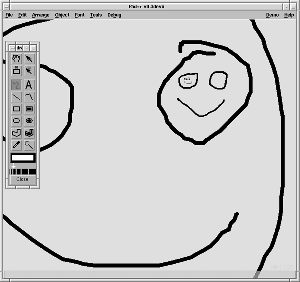
Figure 1
Another activity the children continually wanted to do was create
"X-Ray" stories. What they were referring to was the lens technology
in Pad++. To the children, lenses helped them see what information
was inside of a picture or text. Children simply placed what looked
like an empty box over a picture. When the box was placed over that
picture some "hidden information" was seen [see Figures 2 and 3]. For
example in the case of a cow picture, when a lens was dragged near or
over it, the word "moo" appeared. Thanks to these very basic
activities, we saw a number of possibilities for the development of a
zooming environment that supported children's learning activities.
First and foremost, we saw that children wanted to tell stories. And
what came as a surprise to us, was that the activity of zooming
strongly supported the creation of non-linear stories. It seemed to
be a very natural way for children to tell their stories. They
enjoyed the freedom of piecing together their thoughts and connecting
them any which way they wanted to by zooming. This zooming approach
to story-telling also strongly supported collaboration between
children. Many times one child would begin the story by typing or
drawing, and another child would add the next part of the story in
another part of the Pad surface. In this way, children would work
together endlessly writing, drawing, zooming, and telling their
stories.

Figure 2

Figure 3
For the children, these activities developed and exercised their
visual and verbal literacy skills, and enabled some proficiency with
their use of new technologies. For us as researchers, these
experiences made clear that the children needed zooming story-telling
tools that suited their needs. To begin with, they wanted a better
way to "program their zooms" between story elements. It was far too
easy for the children to become lost on the Pad++ surface when zooming
in the wrong direction. The children also seemed to need different
drawing tools for their story-telling. When using the existing
palette of drawing tools in Pad++, they easily became confused with
all the extraneous tools not necessary for their drawing or writing.
They also had a difficult time when they would zoom on the Pad++
surface and weren't sure why the drawing tools "lived in a different
box from the rest of the things in the zooming world". They didn't
like moving the floating menus around the Pad++ surface. "They're
always in the way of our zooming," said one child. In addition, there
were times that the children also seemed to need our help in getting
started on their stories. They often would ask, "Start me a picture,
please?" With this in mind, we also tried to consider new ways of
offering story resources.
The Local Tools and KidPad
After a short intense period of development, researchers came back to
the classroom with the first version of what we called "KidPad". It
included a new interface paradigm we called "Local Tools" [3].
Instead of traditional floating palettes of tools, there were large,
simple tools that sat directly on the Pad++ surface [see Figure 4].
They reminded a number of children of the "fat pencils they could
write with if they were good". With local tools, children could select
a tool (by single-clicking on it), and the cursor would turn into that
tool in both size and shape. If the child wanted to drop that tool
and use another, the child would double-click in the place they wanted
to drop it and the tool would remain in that place on the Pad++
surface.

Figure 4
These tools included what the children called a "crayon" to draw with,
an "eraser" to delete objects, and an "arrow" to select objects [see
Figures 4, 5 and 6]. The arrow was used in combination with the
picture scrapbook. This scrapbook consisted of a slider to move
through pictures which ranged from green dinosaurs to red hats. Once
the child saw what they wanted, they chose a picture with the arrow,
and dragged the picture onto the Pad surface. Automatically a copy of
the picture would be placed on the Pad surface.

Figure 5

Figure 6
Another local tool was the "magic wand". In response to the
children's love for zooming, and their frustration with getting lost
"on a long zoom" the magic wand was created. When children selected
the wand, then selected anywhere else on the Pad++ surface, a link was
started. The next place children selected was the place that would be
"linked to". These two places could be seen easily because a bright
yellow line connected the two selections. When children de-selected
the magic wand, they could zoom between links by touching a "hot
zooming spot" with another tool. Children seemed to love this
tool. While similar functionality was available in the Pad++
substrate, the interface was not intuitive to children, and therefore
was used very little. Once this became a magic wand with "yellow
magic lines" showing where there would be zoom paths, the children
used this tool repeatedly to tell stories.
In addition to these local tools, there was a "tool box". This box
was placed in the bottom right corner of the screen. When children
clicked on it, all the local tools would zoom back to where they
started, lined up along the bottom of the screen. This turned out to
be extremely useful when children would zoom around the Pad++ surface
and forget where they left their tools.
Children's KidPad Design Ideas
The children seemed to enjoy this new zooming environment. Their
stories became more complex and richer in content and structure,
thanks in part, we believe, to the local tools they used. Once the
children had spent some time with this new environment, we asked the
children to brainstorm with us on how to make a better technology for
them [see Figures 7 and 8]. What we heard from them in
conversations, drawings, and writing were the following suggestions
(these suggestions are only listed if a majority of the children we
worked with raised the issue):

Figure 7
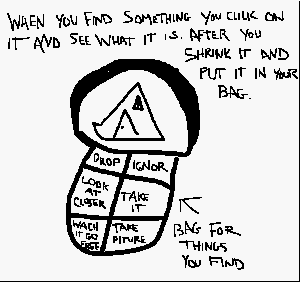
Figure 8
Hardware:
- They wanted to draw directly on the screen (a.k.a. a touchscreen).
- They wanted to turn the mouse into something else besides your
typical mouse (e.g., a rocketship, car, an animal) to make it easier
to zoom (many children with small hands found it difficult to use a
3-button mouse).
- They did not like to double-click the mouse (it was a difficult
motor-coordination skill for children). They wanted an easier way to
"drop tools".
Software:
- They wanted sound for their stories.
- They wanted zooming to take you back in time instead of space (zoom
through history).
- They wanted to use zooming, to zoom into different worlds (e.g., a
game world, a story world, a numbers world, a drawing world).
- They wanted additional drawing functionality: a writing (typing) local
tool, a ruler (to make straight lines), more colors for the crayon,
and paint brushes.
- They wanted dictionaries to help spell their words.
- The wanted to animate their drawings.
- They suggested additional types of pictures be added to the scrapbook:
animals, outerspace planets/creatures, plants, people (from different
ethnic backgrounds), clothes, hearts, houses.
Up until this brainstorming experience, we had generally chosen to
focus our development efforts on "the biggest problem of the week".
At our classroom sessions with children (usually an hour, three times
a week) they would show us where they had difficulties, or suggest new
possibilities. These were generally not large development projects,
but small areas that could quickly be implemented and tested with the
children. However, once examining the results of our children's
brainstorming work, the team went back to the lab to decide what
features seemed to suggest important new directions for the future.
What follows is a discussion of where the children's ideas have taken
us.
KidPad for Preschool Children
Thanks to the abundance of ideas from our child design partners, we
found ourselves (due to limited programming resources) having to focus
on a few areas of development. One important area that the children
pointed out was zooming. We heard and observed that the 3-button
mouse was confusing and difficult to use for many of our children. By
making the left button the select button, the middle button the
zoom-in button, and the right button the zoom-out button, we found
that children usually had to depend on trial-and-error to remember
which button did what. The mice that the children drew had whiskers
and noses for zooming, which we suspected might be much easier to
remember than right button or middle button. Many of them just wanted
to get rid of the mice all together and point at the screen.
Listening to their concerns, we began to focus on alternative zooming
and panning tools that lived on the screen. We created a "zoom in"
and a "zoom out" local tool [see Figure 9]. By picking up a zoom
tool, the cursor became that tool. Moving and pressing it would zoom
at that spot. We also developed a "panning frame" which enabled
children to merely move the mouse over the frame in the direction they
wanted to go and the pad surface would pan in that direction [see
Figure 10]. Each of these tools had the additional feature of
animating when the cursor was over it. We came to the conclusion that
local tools should not have a text label, thus accommodating younger
children. We decided that these tools should only be icons, and that
animating the icons would replace the need for text [1]. The zoom and
pan tools proved to be excellent in their self-explanatory nature.
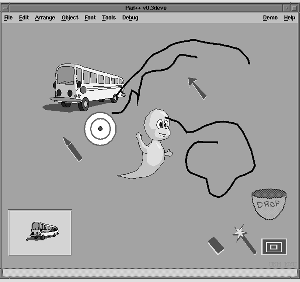
Figure 9
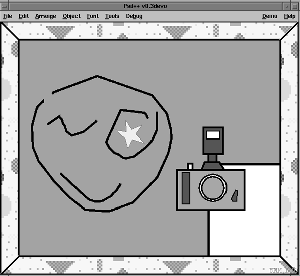
Figure 10
In addition to these tools, we tried developing a "drop bucket", one
which would replace the need for double-clicking to drop a tool.
However, we quickly saw and heard from children that this drop bucket
was not the right solution. The "dropping" was an unnecessary step to
the children. Instead, they wanted to "swap tools" . They wanted to
merely click on another tool and have that tool become the cursor and
have the previous tool be put on the Pad++ surface. We took this to
heart and quickly implemented this interface suggestion.
Interestingly enough, our preliminary results with this version of
KidPad show that these new features, (except for the drop bucket)
seemed to be much more intuitive for children. In fact, it appears
from our pilot tests with a small number of children ages three and
four, that much younger children were able to use these KidPad tools.
KidPad for the Future
What does the future hold for KidPad? There is still a great deal of
work ahead, even to fulfill the initial design suggestions we received
from the children. In a perfect world, we would love a 1,000 more
hours with hundreds of more children, in a relaxed setting outside of
the structure of a typical classroom. But without more resources for
personnel and facilities, we have continued on with our small group of
researchers, finding access to classrooms and children where possible.
Currently, our energies are focused on more short-range areas of
development that support the needs and desires of our child design
partners. We are in the process of expanding the drawing tools,
developing sound capability, simplifying the "X-Ray" interface, and
adding animation functionality. We also would like to see two more
long-range additions to KidPad. The first addition would be in
automating the drawing process. We call it the "DrawMe" tool. It is
envisioned that a child could use this to replicate and modify
existing objects more easily. A child could select the DrawMe tool and
place it over a given drawing. When the child clicks on the drawing,
all the local tools that were used to create this drawing would gather
right below the picture selected. For example, a child might select a
picture of a pumpkin. And what s/he might get with the DrawMe tool
would be an orange crayon, black ruler, and the eraser gathered below
the pumpkin. This would help the child remember what tools s/he used
to create that picture. In addition, it would also show the child how
other children created their drawings, thus spurring on new ideas to
pursue. Once any of the tools gathered directly below a picture were
used, they would function as in the past to create a new picture.
The second set of functionality we see as important, is to support new
forms of collaboration between children. In much of our work we saw
children sharing one computer. Many times they were frustrated when
they could not agree who would get to use the mouse to zoom or to
draw. We observed that more assertive children would tend to
monopolize the use of the computer, frustrating more passive
children. Therefore, we hope to implement software and hardware
support for two mice on one computer. In this way, a computer might
better support the work of two children sharing the same Pad surface.
This is interesting to us, not only from the standpoint of children's
story-telling endeavors, but in terms of new collaboration
functionality for the Pad++ substrate.
SUMMARY
In summary, we believe that not only has our research been furthered
in the area of new technologies for children, but our understanding of
how to work with children as our design partners has been expanded as
well. In addition, our development work on the Pad++ substrate has
also benefited. Thanks to suggestions from our child design partners,
we have simplified the hyperzooming tool and the "X-Ray" or lens tools
in Pad++. In addition, we have continued our exploration of "Local
Tools" in new areas such as layout and design for adults. We have
found that children have a lot to offer, not only when it comes to
helping design new technologies for them, but in designing new
technologies for adults as well.
ACKNOWLEDGMENTS
We would like to thank DARPA's Human-Computer Interaction Initiative
(#N66001-94-C-6039), for its continued funding of the Pad++ research
at the University of New Mexico. We are also indebted to our design
partners at the Lowell Elementary School, in Albuquerque, New Mexico.
In addition, we would like to thank David Rogers for his KidPad
Scrapbook drawings. Finally, we would like to acknowledge the
on-going support, inspiration, and collaboration of the Pad++
development teams at both UNM and New York University.
REFERENCES
- Baecker, R., Small, I., and Mander, R. "Bringing Icons to
Life". In Proceedings of CHI'91 (New Orleans Louisiana, April 1991),
ACM Press, 1-6.
- Bederson, B.B., Hollan, J., Perlin, K., Meyer, J., Bacon, D., and
Furnas, G. "Pad++: A Zoomable Sketchpad for Exploring Alternate
Interface Physics". Journal of Visual Languages in Computing. 7:3,
(1996), 3-31.
- Bederson, B.B., Hollan, J., Druin, A., Stewart J., Rogers, D.,
Proft, D. "Local Tools: An Alternative to Tool Palettes". In
Proceedings of UIST'96 (Seattle Washington, November 1996) ACM Press,
169-170.
- Catterall, B.J., Harker, S., Klein, G., Notess, M., and Tang,
J.C. "Group HCI Design: Problems and Prospects". SIGCHI
Bulletin. 22:2, (October 1990), 37-41.
- Dayton, T. with Barr, B., Burke, P.A., Cohill, A.M., Day, M.C.,
Dray, S., Ehrlich, K., Fitzsimmons, L., Henneman, R.L., Hornstein, S.,
Karat, J., Klinger, J., Lowgren, J., Rensch, J., Sellers, M., Smith,
M.R., "Skills Needed by User-Centered Design Practitioners in real
Software Development Environments: Report on the CHI'92
Workshop". SIGCHI Bulletin. 25: 3, (July 1993), 16-31.
- Dix, A., Finlay, J. Abowd, G., and Beagle, R. Human-Computer
Interaction. Prentice Hall, Englewood Cliffs, New Jersey, 1993.
- Druin, A. "A Place Called Childhood". Interactions. 3:1, (January
1996), 17-22.
- Druin, A. and Solomon, C. Designing Multimedia Environments for
Children: Computers, Creativity, and Kids. John Wiley & Sons, NY,
1996.
- Eisner, E.W. Cognition and Curriculum Reconsidered, 2nd
Edition. Teachers College Press, NY, 1994.
- Harel, I. and Papert, S. "Software Design as a Learning
Environment". In I. Harel (ed.) Constructionist Learning. MIT Media
Lab Publication, Cambridge, MA, 1990.
- Harel, I. Children Designers: Interdisciplinary Constructions for
Learning and Knowing Mathematics in a Computer-Rich School. Ablex,
Noorwood, NJ, 1991.
- Kim, S. "Interdisciplinary Cooperation". In B. Laurel (ed.) The
Art of Human-Computer Interface Design. Addison-Wesley Publishing
Company, Reading, MA, 1990, 31-44.
- Moore, D.M., R.J. Myers, and J.K. Burton. "What Multimedia Might
Do... and What We Know About What It Does". In A. W. Ward (ed.)
Multimedia and Learning: A School Leader's Guide. National School
Boards Association, Alexandria, VA, 1994, 29-41.
- Norton, P. "Literacy By Design". Pre-published Book Chapter 2, New
Mexico, 1995.
- Norton, P. "When Technology Meets Subject-Matter Disciplines in
Education. Part Two: Understanding the Computer Discourse".
Educational Technology. 32:7, (July 1992), 36-46.
- Papert, S. Mindstorms: Children, Computers and Powerful
Ideas. Basic Books, NY, 1980.
- Papert, S. The Children's Machine: Rethinking School in the Age of
the Computer. Basic Books, NY, 1993.
- Spoehr, K.T. "Enhancing the Acquisition of Conceptual Structures
Through Hypermedia". In K. McGilly (ed.) Classroom Lessons:
Integrating Cognitive Theory and Classroom Practice. MIT Press,
Cambridge, MA, 1994.
Last modified: Fri Apr 25 17:10:39 MET DST 1997
CHI 97 Electronic Publications: Design Briefings