


|
|
© 1997 Copyright on this material is held by the authors.

At first blush, WebCard [1] is a conventional folder-based mail reader. The user interface is divided into three regions: a table of contents at the top left, a list of folders at the top right, and a display pane at the bottom. The list of folders shows the folders belonging to the user. There are two distinguished folders: the selected folder and the open folder. Single-clicking a folder selects it, thereby making it the target of move and copy operations. Double-clicking both selects and opens a folder. Each message in the open folder is summarized by a line in the table of contents, containing a message number, the date the message was sent, the sender of the message, and the subject field.
At any given time one message from the open folder, called the selected message, is shown in the display pane of the WebCard window. The corresponding line in the table of contents is highlighted. Clicking on a different line, or using the up and down arrow buttons, changes the selected message. The user can respond to the selected message, forward it, copy or move it to the selected folder, and so on. (Actually, more than one message can be selected, but some operations, such as "Reply," are only valid when there is a single selected message.) Users can also perform standard operations on folders, such as creating, renaming, and deleting folders.
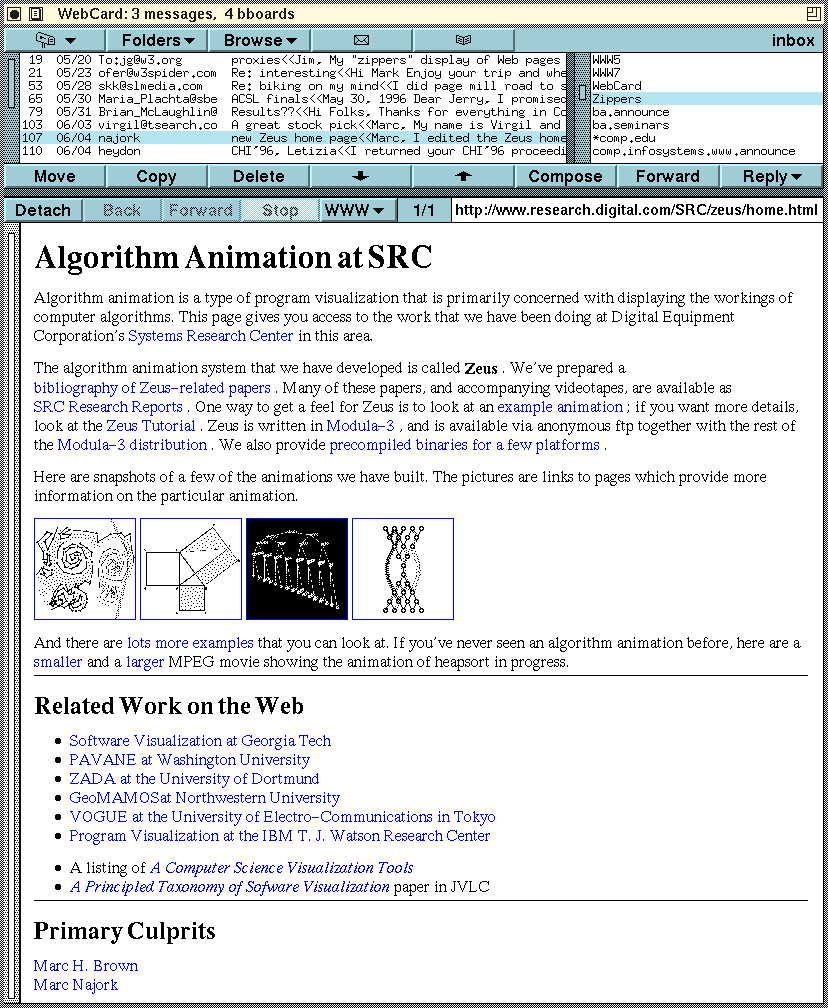
WebCard is also a Web browser: Web pages are displayed in the display pane that normally shows the contents of a mail message or news article. There are three ways to bring up a Web page: by clicking on a URL that appears in the currently selected mail message or news article; by typing the URL into a dialog box that is opened by left-clicking the "WWW" button; and by selecting a URL in an arbitrary window (e.g., by highlighting it with the mouse) and then middle-clicking the "WWW" button. Once a Web page is displayed, clicking on a link fetches the associated page, which then replaces the existing page in WebCard's display pane.
Whenever WebCard displays a Web page, the menu bar at the top of the display pane changes to contain "Back," "Forward," and "Stop" buttons, and a pull-down menu labeled "WWW." The "Back" and "Forward" buttons traverse the chain of Web pages that have been visited. The "Stop" button cancels any retrievals in progress, and the "WWW" menu contains a variety of Web-oriented commands, such as "auto surf," described later.
Once in a folder, Web pages can be moved or copied to another folder just like any mail message or news article. The only mail/news operation that doesn't make sense for a Web page is "Reply."
Folders provide a convenient way for users to organize material. For example, a user can keep the home pages of all his or her colleagues together in a folder named "Colleagues," or keep all pages, news articles, and mail messages about the Boston Red Sox in a folder named "Bosox." The advantage of WebCard folders over bookmarks in conventional Web browsers is that WebCard folders can also contain mail messages and news articles. And the advantage of WebCard folders over folders in conventional email or news readers is that WebCard folders can also contain Web pages.
WebCard uses folders to return the results of certain operations. For example, the search command creates a new folder containing all items in the open folder that contain a specified string. A more innovative use of folders is for the "Auto Surf" command, which traverses every link on a particular Web page and returns all resulting pages in a new folder. The retrieved pages can be traversed conveniently just by clicking on the up and down arrow buttons.

WebCard allows users to detach the display pane, making it a separate pane (called a detached pane) in the WebCard window and causing a new display pane to appear. Detached panes can be deleted when no longer needed, and there can be an arbitrary number of them. This feature allows a page to remain visible for an extended period of time, even while following another chain of links in the display pane. This use of detached panes is similar to opening a new Web browser window in conventional browsers.
Another use of detached panes is to make it easier to explore lists of links, often found on home pages. When clicking a link in the detached pane, the new Web page appears back on the display pane rather than obscuring the item in the detached pane. Without a detached pane, the user would need to issue the "Back" command after each link was visited.

In order to address the problem of a small amount of vertical real estate, WebCard can display Web pages using zippers [2], an application of outline-processor technology. Zippers allow users to expand and contract selected sections of a document, thereby displaying simultaneously the contents of individual sections of a document as well as its overall structure.
|
|