

|
|
An innovative method for visually and functionally combining the elements of motion, time and distance in a three-dimensional computer animation is presented. At a glance, the elapsed time of the movement, distance traveled, relative velocity, scale and the object orientation can be derived from a single visual representation. Creation and editing of animations can also be simplified through the use of an interrelated set of immersive three-dimensional user interface elements.
3D Animation, 3D Interfaces, Interactivity, Visual Design
© 1997 Copyright on this material is held by the authors.
One of the key aspects of designing a three-dimensional (3D) animation or interactivity program is choosing how to depict and control the movement of objects and characters in the scene. Choose incorrectly here, and your program quickly becomes unusable. Add to that the need to associate the element of time with that movement, and you have the makings of an interesting design problem, and possibly a major headache.
There has been a great deal of research in this area, and many products that have approached this design problem in innovative
ways [1]. Many follow the current trends in software user interface design and utilize direct manipulation and 3D interface
widgets to accomplish the animation functions [2]. But even with that relatively well understood means of manipulating objects,
there still remains a basic problem.
How can you clearly represent the animated movement of an object over time in three-dimensional space when the animation is
not running? And secondly, can the elapsed time of the movement, distance traveled and object orientation be derived from that
representation?
The approach that many existing 3D animation systems take is to separate the individual parts of the problem. The time aspect is
dealt with in a timeline window that shows each objects movement over time with the relevant key frames. This is generally
combined with another window that displays the motion path of the objects, displayed as a line projected onto
three-dimensional space (3-Space). But, this approach fails to map the time element onto the motion path, which would create a
far more useful representation.
The very first sketches of the interface featured ghosted, transparent duplicate copies of the object distributed along the motion path. That approach was set aside quickly when the performance of the target hardware was considered. The design would have to be scaled back.
The next approach was essentially a scaled down version of the first. The ghosted images of the object were collapsed into a
single line or curve segment. The child's toy, "Mini Curves 'n Waves" by Anatex, pictured in Figure 1. was a great physical
model for the design.
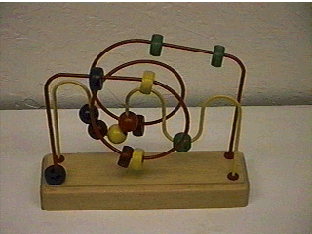
Figure 1. A child's toy3 captures the essence of the design.
"Hose View" combines the elements of motion, time and distance in an innovative way to provide a visually clear overview of
3D animation. In a either a frozen frame or interactive animation sequence, the elapsed time of the movement, the distance
traveled and the object orientation can be derived from the visual representation. Creation and editing of animations could also
be simplified through the use of Hose Viewís interrelated set of 3D user interface elements.
There are several key 3D user interface elements that comprise a ìhoseî. Each is integral to the overall design goal - representing motion, speed (time and distance) and orientation in a visually clear way. The ability of a user to filter out unwanted or unneeded user interface elements is a major feature of this user interface system.
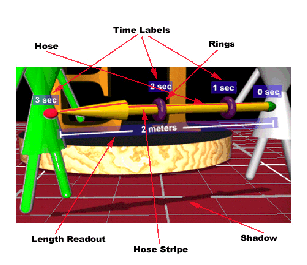
Figure 2. Key user interface elements of Hose View.
The most prominent visual elements of Hose View are the Hoses themselves. Conceptually, the Hoses behave as if they are constructed of flexible tubing, just like their real world inspiration. The Hose Stripe is an immediate and clear visual clue to the objectís orientation at that point along the motion path. The Rings show the animated objectís position along the motion path and at a specific time during the animation.
Time Labels eliminate any ambiguity about how much time has elapsed for the object to reach the associated ring. A curved
motion path can be constructed by adding Anchor Points to break up the hose into segments. Artificial Shadows provide spatial
position feedback when the hoses are repositioned or manipulated by the user. Length Readouts provide visual feedback about
the distance an object travels on a motion path
The first implementation test of this approach is being tried in a 3D authoring environment based on the Virtual Reality
Modeling Language (VRML) 2.0 specification. VRML 2.0 applications are well suited to test the scaleability of this interface
design.
The innovative Hose View interface design addresses the problem of how to combine the elements of motion, time and distance in a single set of interrelated 3D user interface elements. Through the use of these interface elements, the overall motion found in 3D animations can now be presented in a visually clear way.
There is equally great potential to bring clarity or confusion (clutter) to the 3D animation environment by using these
techniques of mapping multiple aspects of animation onto one set of immersive 3D user interface elements. Thorough user
testing is required to refine the initial approaches and assumptions that make us believe that this is a promising area of research.
|
|