CHI 97 Electronic Publications: Late-Breaking/Short Talks
Support for Cooperatively Controlled Objects in Multimedia Applications
Lauren J. Bricker, Marla J. Baker, Steven L. Tanimoto
Dept. of Computer Science and Engineering
University of Washington, Box 352350
Seattle WA 98195-2350 USA
Tel: +1-206-543-1695
E-mail: {bricker, marla, tanimoto}@cs.washington.edu
ABSTRACT
This paper presents a class of objects that facilitate building software for "close collaboration." A definition is given for "cooperatively controlled objects" and three example activities are described.
Keywords
Computer supported collaboration, multiple-user interface, Co-presence, cooperatively controlled objects, multimedia.
© 1997 Copyright on this material is held by the authors.
INTRODUCTION
This paper presents a class of interface objects that facilitate constrained close collaboration among the users of multimedia computer programs. Systems for computer-supported collaboration typically support communication of concepts, discussion of solutions, resolution of cognitive conflicts, and promote problem solving. Collaboration may also add an enjoyable aspect to a task, particularly when the participants are focused on closely connected objects. We note that the goal of forced collaboration in a learning situation may not be to make the task easier than it would be for a user in a traditional single-user environment, but may be designed to bring the users together in particular ways. An analogy is the winning of a running race; an individual could easily beat a pair of runners who each have one leg bound to one of the other's, but a "three-legged race" is an activity that has social, team-building, and entertainment value of its own.
There are a number of collaborative systems which encourage communication through common objects[5], tasks[4] or physical situations[1]. Groupkit[5] and Turbo Turtle[3], in particular, use telepointers and other "awareness widgets" to indicate to others where a user is working in the system. These systems do assist collaboration, but in many cases users still may work independently on a task, communicating infrequently to exchange files or merge objects.
We believe that there are some situations in which a common focus and close communication facilitate the learning process. We are developing a library of "cooperatively controlled objects" which are designed to encourage synchronous, complex, and collaborative interactions. The state of a Cooperatively Controlled Object (CCO) may be simultaneously manipulated, perhaps in complicated ways, by multiple users. Thus, a computer system which supports CCOs must provide input devices that are each controlled by a different user.
The components or "properties" of a CCO may be manipulated using general methods, such as constraints between user inputs and application objects. Fine-grain sharing, studied by Shen[6], is one method to implement an object shared in terms of its parts such that each part may be controlled by a different user. Although fine-grain sharing can offer users a clear delineation of responsibility and control for shared objects, it does not necessarily enforce synchronous manipulation by multiple users.
For example, a point may be controlled by decomposing it into its x and y coordinates which are modified by separate users as shown in Figure 1. The cooperatively controlled point in Figure 2 involves four users simultaneously altering the location and slope of two intersecting line segments using the endpoints. The location of the cooperatively controlled point is determined by the intersection of the two lines.

Figure 1. Controlling the location of a point using a fine-grain sharing technique.
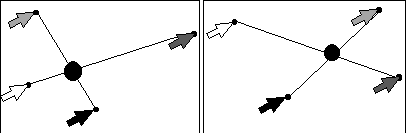
Figure 2. Cooperative control of the location of a point by four users
COIMAGE: Three Collaborative activities
Cooperatively controlled objects are currently being implemented in a library called the Collaborative Object-based Application Program Interface, or CO-API. A sample application program, entitled CoImage, has been developed using this co-present version of CO-API. CoImage includes three multi-user activities: collaborative image warping, a jigsaw puzzle, adrawing program and skill game reminiscent of Etch-A-Sketch®. The CO-API library and CoImage application have been developed for the x86-based PC platform with Microsoft Windows. As in Bricker et. al.[2], this system currently uses the Access.Bus multiple input system from Computer Access Technology Corporation to allow each user to have own a mouse and corresponding colored cursor on the screen. The color of the cursor identifies its user.
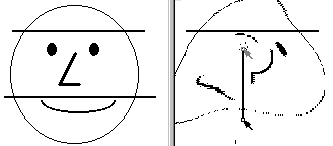
Figure 3. The Collaborative Image Warper
The collaborative image warping activity, shown in Figure 3, charges the users to draw and manipulate warping-control line segments on the source or destination image. The segments are drawn individually, but they may be altered by one or both users simultaneously. Segments are translated by clicking and dragging on the middle of the line and are rotated by manipulating the location of the endpoints. When all the lines are in place, either user may begin the warping of the image. While the lines are controlled through a fine-grain sharing mechanism, we could easily modify this activity so that lines may only be rotated when both users are manipulating distinct endpoints, guaranteeing a simultaneous interaction.
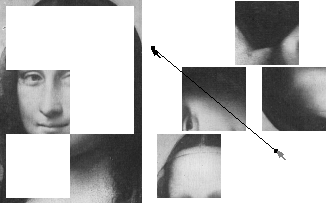
Figure 4. The Collaborative Jigsaw Puzzle
In the collaborative jigsaw puzzle activity shown in Figure 4, the CCOs are the puzzle pieces. Each piece is controlled by a line segment. The centroid of the puzzle piece is constrained to the midpoint of a line segment. Two users adjust the location and rotation of each piece by manipulating endpoints of the segment.
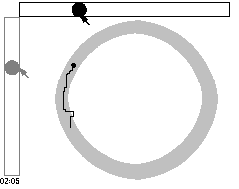
Figure 5. A Collaborative Etch-A-Sketch Activity
What we call the Etch-A-Sketch™ activity allows the users to draw with one of three different cooperatively controlled pens. The simplest control, shown in Figure 5, allows each user to manipulate a slider, each of which corresponds to either the x or the y coordinate of the pen. A more difficult control constrains the location of the pen to be the midpoint of a line segment. This line may be manipulated in the same manner as in the two activities described previously. The most difficult control involves four users manipulating the pen as in Figure 2. This activity also may be timed. Once the clock begins, the users must keep the pen within the boundaries of a background object or time gets added to their total.
FUTURE WORK
CO-API currently supports the Access.Bus multiple input device platform. The Universal Serial Bus (USB) is a new industry standard way of handling multiple input devices, including mice. As the USB standard gains support in the industry, we intend to modify our system to use it. Also, the current version of our system is only implemented for a co-present situation, although these objects extend naturally to distance collaboration.
CONCLUSIONS
This paper has given a description of CCOs and an application which includes three collaborative activities. CCOs differ from fine-grain shared objects in the following ways: CCOs are typically manipulated by more complicated, higher degree-of-freedom, or less intuitive methods than fine-grain shared objects. Additionally, CCOs may enforce a tighter synchronization than other methods of controlling objects. It is hoped that these objects will lend to software that improves collaboration, conflict resolution, problem solving and higher-order thinking skills.
REFERENCES
- Bier, E. and Freeman, S. MMM: A User Interface Architecture for Shared Editors on a Single Screen, in UIST'91, (Hilton Head, November 11-13, 1991), ACM Press, N.Y., pp 79-86.
- Bricker, L., Tanimoto, S., Rothenberg, A., Hutama, D., Wong, T. Multiplayer Activities Which Develop Mathematical Coordination, in Proc. CSCL'95 (Bloomington, October 17-20, 1995), ACM Press, N.Y., pp 32-39.
- Cockburn, A. and Greenberg, S.
Children's Collaboration Styles in a Newtonian MicroWorld, in Proc. Proceedings of CHI 96 Human Factors in Computing Systems (April 13-18, Vancouver, BC), ACM/SIGCHI , N.Y., 1996, pp. 181-182.
- Fishman, B. and D'Amico, L. Which Way Will the Wind Blow? Networked Computer Tools for Studying the Weather, in Proc. Of Ed Media '94 (Vancouver, June 25-30, 1995), ACM Press, N.Y., pp 203-208.
- Gutwin, C, Stark, G., and Greenberg, S. Support for Workspace Awareness in Educational Groupware, in Proceedings of CSCL'95 (Bloomington, October 17-20, 1995), ACM Press, N.Y., pp 147-156.
- Shen, H. and Dewan, P. Access Control for Collaborative Environments, in Proceedings of CSCW'92 (Toronto, October 31-November 4, 1992), ACM Press, N.Y., pp 51-58.
CHI 97 Electronic Publications: Late-Breaking/Short Talks