CHI 97 Electronic Publications: Late-Breaking/Short Talks
From the Flashing 12:00 to a Usable Machine: Applying UbiComp to the VCR
Jeremy R. Cooperstock
Sony Computer Science Laboratory
3-14-13 Higashi-Gotanda
Shinagawa-ku, Tokyo, 141, Japan
+81-3-5448-4380
jer@csl.sony.co.jp
ABSTRACT
The hype of intelligent appliances and "smart homes" has so far failed
to produce consumer electronics technology of mass appeal. It is our
contention that common frustration with overly complex user interfaces
has been the foremost obstacle preventing society from reaping the
benefits promised by such technology. In order to replace the remote
controls and command consoles that litter both our work and home
environments, we suggest that existing technologies can be combined to
enable more appropriate human-computer interaction, and thus, produce
truly usable machines.
Keywords
Ubiquitous Computing, VCR, interface design
© 1997 Copyright on this material is held by the authors.
INTRODUCTION
At home I used to have a very intelligent VCR with near perfect
voice recognition and knowledge of me. I could ask it to record
programs by name and, in some cases, even assume it would do so
automatically, without my asking. Then, all of a sudden, my son went to
college. (Negroponte [4]).
Negroponte's joke reflects a sad truth not only concerning VCR
interfaces but about modern technology as a whole. In our day-to-day
activities, we are confronted by numerous examples of feature-rich
devices that are either too complex or confusing for most of us to
operate successfully [5].
Ubiquitous Computing (UbiComp) [8] proposes to overcome our
frustration with this situation by endowing everyday devices with
computational abilities and allowing the user to interact with them
without the mediation of a traditional computer interface. This
approach has been successfully demonstrated in a computer-augmented
videoconference environment known as the Reactive Room [2]. However, before we commit
ourselves to developing an extensive infrastructure of such
computer-augmented devices for general use, it may be worthwhile to
investigate the improvements possible to a single appliance through
UbiComp. After all, a fully integrated "smart house" is of little use
if the owner cannot even access the functionality of a single device in
isolation. We therefore turn our attention to one of the most notorious
examples of poorly designed appliances, namely, the VCR.
WHAT'S WRONG WITH THE VCR?
The VCR provides an excellent example of modern technology that has
recently found its way into a majority of American homes [6]. Unfortunately, like so many
other feature-rich appliances today, the full potential of these
machines is rarely exploited. How many VCRs in the country are
presently flashing "12:00" because the owner lacks the patience or
expertise to set the clock? Marcus cites a survey of R.H. Bruskin &
Associates, indicating that one-third of American VCR owners have given
up programming these devices because they cannot understand the
instructions and controls [3].
Put simply, there are
generally too many buttons either on the device itself or on the
associated remote control, making it exceedingly difficult for the
bewildered user to figure out how to perform anything but the most
basic task. Adjusting the clock or setting the VCR to record a program
at some future time often requires over a dozen button presses, or, in
the case of VCRplus systems, manual consultation of the TV guide in
order to determine the appropriate program code.
THE UBICOMP VCR
Our UbiComp-inspired solution to such problems involves a
combination of alternative interfaces and automatic interaction with an
on-line database of program schedules and user-specific information.
The intention is to reduce a reliance on the multi-button remote
control while permitting technically unskilled users to access the full
functionality of the VCR. Before elaborating on this approach, we
review the design goals that we believe are imperative for its
success:
-
provide the user with high-level interaction capabilities so that tasks
such as program recording can be specified easily
-
hide controls that are irrelevant to the current task
-
allow full manual override of any function at any time, for example,
timer-record programming by the traditional specification of channel,
date, start and end times [7]
-
ensure that timely, meaningful feedback is provided to the user
concerning the execution of each command
Alternative Interfaces
Conventional remote controls only permit low-level interaction, for
example, requiring that a program to be recorded is specified by
entering the channel, date, start and end times. Instead, we have
incorporated a speech recognition system with a program schedule
database so that users can specify programs to record by name. When the
speech recognition system fails to uniquely identify a matching
program, the most promising candidates are displayed on-screen, and the
user can select the appropriate one by index number. Schedule details
are then provided automatically by the database and the VCR essentially
programs itself. Following our design goals, this program information
is displayed for user verification, and can be manually edited if any
changes are desired [1].
Voice-activated commands are not always ideal or even appropriate,
such as for simple play/stop/rewind controls or for timer-program
editing as just described. The use of on-screen displays provides the
motivation for a pointing or selecting tool to access such functions.
Candidate technologies include a wireless mouse and a laser pointer
with calibrated detector.
Prototype Implementation
In our prototype implementation, pictured in
Figure 1, a video camera with a
low-red bandpass filter is used to detect the position of a laser beam
on the television monitor. When a user points a laser pen at the
screen, the system responds by generating a video overlay menu on the
monitor. Basic tape transport and channel selection controls can then
be invoked by selecting the corresponding icon. The behaviour is
similar to a conventional remote control, except that users do not need
to look away from the screen in order to find the appropriate button.
Furthermore, different menu screens can be generated that are relevant
to the current task, for example, frame advance/rewind commands can be
highlighted when the pause mode is invoked, and similarly, dubbing
commands can be highlighted in record mode.
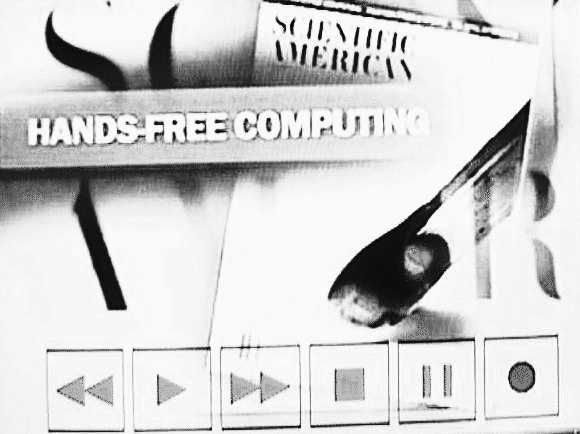
Figure 1. Video-overlay menu of generic VCR tape transport icons
produced in response to the detection of a laser beam on the television
monitor.
Exploiting context and on-line information
VCRs are typically insensitive to additional context such as the
scheduling information of the current program being viewed on the
television. By exploiting this readily available information, our
augmented VCR can respond intelligently to utterances such as "record
this show next week" or "when will this program next be aired?"
CONCLUSIONS
As other similarly augmented devices become available, we can realize
coordinated behaviour through their interaction with each other. For
instance, the television could automatically lower its volume when the
telephone is in use. In the near future, we might expect our VCRs
to learn our viewing habits through experience and automatically record
certain programs without being told. The scenario described by
Negroponte [4] need not be
limited to human-human communication. We believe that the UbiComp
approach, applied thoughtfully to a broad spectrum of appliances, has a
tremendous potential to improve the quality of human-computer
interaction, and hence, increase the benefits of technology to its
users.
ACKNOWLEDGEMENTS
This paper is based on research conducted by the author while a member
of the Ontario Telepresence Project at the University of Toronto.
REFERENCES
-
Cooperstock, J.R., Fels, S.S, Buxton, W. and Smith, K.C. Reactive
Environments: Throwing Away Your Keyboard and Mouse. To appear in
Communications of the ACM.
-
Cooperstock, J., Tanikoshi, K., Beirne, G.,
Narine, T., and Buxton, W.
Evolution of a Reactive Environment.
In Proceedings of Human Factors in Computing Systems CHI 95, (May
7-11, Denver, CO). ACM Press, New York, 1995, pp.
170-177.
-
Marcus, A. The
Future of Advanced User Interfaces in Product Design. In Proceedings
of Tenth TRON Project International Symposium, (Tokyo, Japan). IEEE
Computer Society, 1992, pp. 14-21.
-
Negroponte, N. Being Digital. Knopf, New
York, 1996.
-
Norman, D.A.
The Psychology of Everyday Things. Basic Books, New York,
1988.
-
Venkatesh, A.
Computers and Other Interactive Technologies for the Home.
Communications of the ACM, 39,12, (December 1996),
47-54.
-
Vicente, K. and
Rasmussen J. The Ecology of Human-Machine Systems II: Mediating "Direct
Perception" in Complex Work Domains. Ecological Psychology, 2,3,
(1990), 207-249.
-
Weiser, M. Some Computer Science Issues in Ubiquitous Computing.
Communications of the ACM, 36,7, (July 1993),
75-83.
CHI 97 Electronic Publications: Late-Breaking/Short Talks