CHI 97 Electronic Publications: Late-Breaking/Interactive Posters
Integrating Tools into the Classroom
Roland Hübscher, Sadhana Puntambekar, Mark Guzdial, Janet L. Kolodner
EduTech Institute & College of Computing
Georgia Institute of Technology
Atlanta, GA 30332-0280 USA
+1 404 894 9218
{roland, sadhana, guzdial, jlk}@cc.gatech.edu
ABSTRACT
SMILE, a learning environment for collaboration and design, is based on
our experience with synchronous and asynchronous collaboration tools in the
classroom and sound principles of software and interface design. SMILE provides
a more holistic approach to supporting student reasoning and activities rather
than the more reductionist tool-based approach we had started with. This more
holistic approach focuses on the cognitive processes involved in doing design
and learning from that experience, rather than focusing on activities that
students are carrying out. This new emphasis has also allowed us to identify
ways of integrating scaffolding for metacognitive and reflective reasoning that
were not naturally integratable into the previous framework.
Keywords
Science education, educational technology, collaborative learning environments, process-based scaffolding
© 1997 Copyright on this material is held by the authors.
INTRODUCTION
A general trend in designing software environments in support of
learning is to integrate a collection of tools that each of which support tasks
identified as important to student learning [2, 4]. Typically, the designer
identifies the activities students are engaging in, builds tools for each
activity, integrates those tools, and then adds scaffolding on top to make the
tools more usable (Figure 1). Using this approach we have developed effective
experimental systems in support of learning [3]. But we are not convinced that
this approach results in the best environments in support of learning. In
particular, we have seen that by focusing on tools that support individual
activities, e.g., the synchronous and asynchronous collaboration tools PABLO
and WebCaMILE respectively, that support individual activities, it is all too
easy to ignore the demands of the larger context. The needs in a classroom
include support for the social environment in which the system is to be used,
to focus on support for activities rather than support of learning, and to
forget the limitations of a single teacher in a classroom, all leading to
designs that are less powerful, effective, easy to use, and easy to implement
than they could be. More important, we believe, is to focus on the cognitive
activities students are engaging in and the context of the classroom in which
this is being carried out.
This analysis led us to a set of design
principles that goes beyond providing students with suites of tools: (1) the
learner must be guided through the process of learning and designing; (2)
meta-knowledge and meta-skills (such as planning, monitoring, revising, and
evaluating) need to be emphasized; (3) the tools must be seamlessly integrated;
(4) the teacher's activities must be integrated and supported as well; and (5)
the tool must be engaging and offer clear affordances to the learners at all
times.
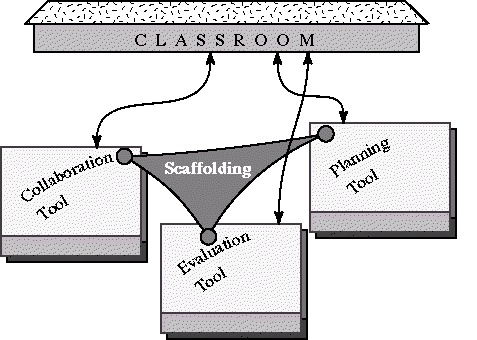
Figure 1: A collection of tools held together by scaffolding. Integration into
the classroom is problematic.
We've implemented these design principles in a new learning environment called
SMILE (Scaffolded Multi-user Integrated Learning Environment). The scaffolding
component is the most important part of SMILE and the tools' task is to support
the scaffolding. Thus, the role of scaffolding and tools are reversed. Rather
than considering each activity students undeertake as individual activities, in
SMILE, we support all decision-making and communication activities in a common
way, by providing note-taking facilities that integrate decision-making and
communication activities, such as synchronous and asynchronous collaboration,
planning, generating ideas and hypotheses, and comparing and evaluating
alternatives. A note-base forms the backbone for the system. Rather than having
individual tools, the system provides different views of the same information,
each view appropriate to some decision-making activity. While our previous
implementation integrated tools for synchronous and asynchronous collaboration,
this new implementation integrates record-keeping formats.

Figure 2: Views (formerly tools) support scaffolding of the learning process in
the classroom.
Our design guidelines of the previous system were therefore extended with
following principles:
- Tools are viewed as different interfaces to a common note base. Each
interface is represents the notes in a way appropriate to the task the tool
supports. To stress this point, we have started calling tools views.
- The activities of the teachers are integrated into the tools. Also these
activities are supported by process-based scaffolding and tools (views).
- Scaffolding based on the process of design and learning activities guide
the learner [1] through design and learning activities, helping students choose
which views of their data might be most appropriate and helping them decide
what to do next and why.
Tools as Representations
A tool in SMILE supports an activity by (1) presenting information from
the note base in a way appropriate to the activity and (2) providing
functionality suitable to manipulating the information. The intention is to
support the cognitive, meta-cognitive, social, and action processes needed both
to accomplish the end result and to learn from the experience.
In essence, each view of the note base provides a different representation for
students to work from. Tools can now be seen as representations. The approach
has practical advantages. The interface is much more consistent since each tool
is just a different view of a subset of the note base. Integrating tools is
much more feasible because the tools are not really different. Adding new tools
(views) to the repertoire will be relatively easy to implement and to integrate
in a usable way into the package. Users enjoy consistency and don't need to
learn to use a collection of disparate interfaces; they will be able to
transfer most of what they learned for one tool to the next.
Scaffolding the Design Process
A computer-based learning environment has only a chance of being useful
in the class room if the technology and the class room are well integrated with
each other. We believe that the learning process is the best place to
interface the software and the class room. Our goal and the main task of SMILE
is to support the students' learning and designing process by scaffolding the
process. Thus, we view SMILE mainly as a process scaffolding tool that employs
tools like PABLO and WebCaMILE to support scaffolding.
ACKNOWLEDGMENTS
This work was supported by the EduTech Institute through a grant from
the Woodruff Foundation, ARPA grant N66001-95-C-8608, and the Academic Program
Initiative of the Georgia Tech Foundation.
REFERENCES
1. Derry, S. J. and Hawkes, L. W. Local cognitive modelling of problem
solving behaviour: An application of fuzzy theory. In S. P. Lajoie and S. J.
Derry, (Eds.), Computers as cognitive tools. Hillsdale, NJ: Erlbaum,
1993.
2. Guzdial, M. Software-realized scaffolding to facilitate programming for
science learning. Interactive Learning Environments, 1995.
3. Guzdial, M., Kolodner, J.L., Hmelo, C.E., Narayanan, N.H., Carlson,
D., Hübscher, R. Turns, J., and Newstetter, W. Computer support for
learning through complex problem-solving. Communications of the ACM,
39(4):43-45, 1996.
4. Hmelo, C.E., Narayanan, N.H., Newstetter, W., and Kolodner, J.L. A
multiple-cased based approach togenerative environments for learning. Presented
at the Second Annual Symposium On Cognition and Education, Varanasi,
India, December, 1995.
CHI 97 Electronic Publications: Late-Breaking/Interactive Posters