

|
|
Web browsers enable people to negotiate millions of pages with the click of a mouse button. A mouse click is one of the most familiar operations for an experienced computer user in a traditional computing style. However, there are two major difficulties with current browsers. To visit Web pages, a user must first read a hyper-text link and then, if suitable, click on it. These browsers demand a high level of user concentration while engaging in the frequent operations they require.
There is also an intrinsic difficulty in Web pages. Authors of Web pages frequently use large volumes of text on each page. This makes pages wordy and difficult to read on screen[5, 10]. Furthermore, for a large documents, user must scroll to see the entire page. Therefore, any off-screen hyper-text link increases the complexity of user operations. Moreover, browsers don't support an effortless way to view multiple pages. Both the user's mental effort and the number of operations proportionally increase with each extra page viewed. Thus, the user is relegated to sitting in front of the computer, staring at the display for a long time.
Recently, compact computers which have the exclusive function of network access have appeared. Such compact computers, often referred to as Network Computers (or NCs), don't have high-resolution displays, but are connected to television sets with large viewing screens. NC vendors intend to allow users to view the Web from a comfortable sofa or their favorite chair in the living room. The user is also able to share what s/he finds with family and friends. This new style of Web-access is growing in popularity.
Thus, there is a need for a browser which can reduce both the number of operation and the attendant mental concentration.
In this paper we propose a way of viewing the Web and its problems, and propose a innovative browser named "WebStage" to alleviate these problems. Unlike conventional browsers, WebStage shows Web pages using a television metaphor.
Hard Searchers: there are users who have explicit goals. They need a method to obtain satisfactory information at minimal cost. Such a style of Web-access can be considered more as a traditional style of computing.
Fun Strollers: There are users who don't have explicit goals, but they hope to come across interesting pages. They want a method to increase the chance of finding novel pages. They are almost same as the "net-surfers"
Passive Recipients: There are users who don't have explicit goals, but have a desire to view the Web. They don't have enough spare time to be Hard Searchers or Fun Strollers, although they have an interest in information on the Web. They include users who access only a few specific pages habitually and wish to reduce tiresome operations. People who are not familiar with computers are considered "hidden" Passive Recipients.
Many improvements for Web browsers have been proposed[3, 9, 12], however, they are effective only when the user is directly in front of the computer. Only Hard Searchers and Fun Strollers can receive the benefits of such improvements. Passive Recipients don't like to, or cannot, sit in front of computers. A person watching TV doesn't sit less than a meter from the TV-set, virtually nose-to-screen. Thus, a new design for viewing the Web is needed for Passive Recipients. It must free people from sitting just in front of a monitor of a computer.
A natural candidate to provide a way of viewing the Web for Passive Recipients is the TV-program metaphor. Features of the TV-program metaphor we intend to project onto a Web browsers are as follows:
a. A Visually and Auditory Enhanced Appearance Needless to say, a real TV-program consists of multimedia information. Graphics are displayed mainly on-screen. These are sometimes accompanied by short text strings which allow people to catch abstract information easily. Narration provides detailed information. Supplementary images and sound (sound effects, background music etc.) "dress-up" the information to convey atmosphere. Such usage of multiple media attracts people and allows easier acquisition of information.
b. Simple Operation and Continuous Output Television sets are a very familiar part of daily life. Everyone knows that once a television is turned on, broadcast programs can be viewed continuously until it is tuned off. Other operations, such as choosing channels and turning up or down the volume are optional. If a browser had these features, it would be helpful for "passive" users.
It is taken for granted that browsers display Web pages document-style. However, there are no explicit rules regarding how to display HTML documents. HTML tags only describe the structure of a document.
Thus, we treat these tags as marks describing structures which guide the generation of a TV-program-like appearance. Furthermore, we propose a new browser which transforms Web pages into multimedia, and allows display with less interaction. We call this browser "WebStage".
WebStage transforms Web pages written in HTML into multimedia as shown in Figure 1.
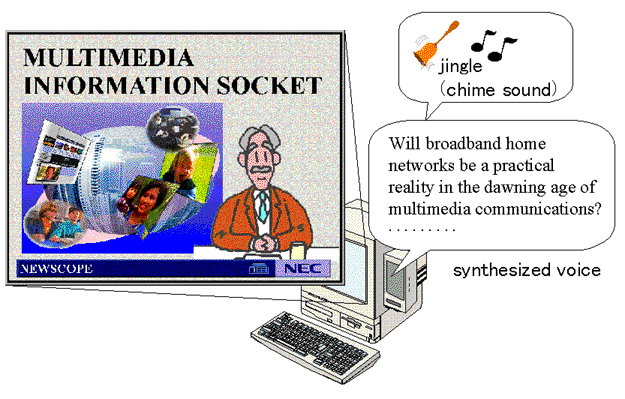
Fig. 1 Output example of WebStage

Fig. 2 Output example of a conventional browser
Titles and captions are extracted from the page, and displayed on the screen in large fonts. Other text strings are read out by a text-to-speech synthesizer. Inline graphics are enlarged and displayed mainly on-screen. A supplementary graphic for the page will be inserted if there is no appropriate inline graphic. Some background music or sound effects are added to increase the attraction of the user interface.
In Figure 1, the sentence "MULTIMEDIA INFORMATION SOCKET" is extracted as a caption because the sentence has the HTML tags for "heading". Then the sentence is displayed on the screen in large fonts. The following sentences, "Will broadband home network . . ." is read out by the text-to-speech synthesizer. Although this page contains several inline graphics, they are either small or narrow. As such, it is considered to have no associated graphic in the page. A graphic related to "MULTIMEDIA" is supplanted. A picture of an announcer is also added to give the impression of a news program. In a news program, music is not used, but a simple chime sounds at the beginning of each topic to notify the user that a new topic is being introduced.
Channels Figure 3 shows an example of a WebStage's Channel-Panel with fifteen channels. Each channel has a set of Web page Uniform Resource Locators (URLs) relating to a certain topic. For example, the "News" channel in the center of the panel contains URLs related to newspaper articles, the "Science" channel under the News channel is for scientific topics.
These clusters of URLs can be obtained with other Web search engines or directory services (the channels in Figure 3 were designed to be able to work with categories in the "Yahoo" directory[16], with the exception of the right-hand bottom-most one). WebStage also takes pages obtained from these search engines and follows their hypertext links to obtain still further pages.
After a user chose a channel, a certain program is come out automatically and another program will come out continuously after it is finished. The order of programs can be controlled by a user with simple operations like a videotape player. The user can skip and replay the current program. The user can also go back to previously played programs one by one.
Current version of WebStage accepts single key operation. The only thing a user have to do is hitting a key, 'S' to skip, 'R' to replay a program and 'B' to go back to a previous program. Any other key leads the user to the channel panel. These simple key operations can be transferred easily into a remote control unit of a conventional television set.
Time Tables Another way to reduce the number of user operations is to provide timetables for displaying programs. WebStage decides the program by guessing user's need according to the time.
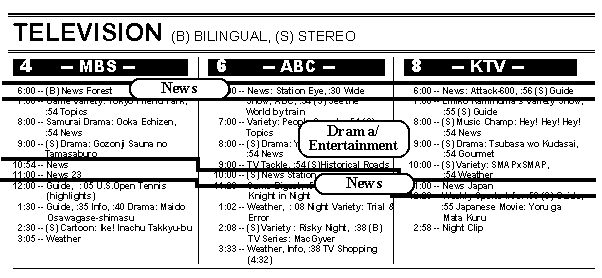
Like the real TV-program schedule, the WebStage browser generates a table of URLs corresponding to time. Figure 4 shows a part of a real TV-program schedule. The schedule was carefully planned to fit the TV viewers' daily activity patterns. Most of the channels have similar patterns to that shown in Figure 5. For example, from 6 p.m. to 7 p.m., most stations broadcast news programs. From 7 p.m., entertainment programs such as dramas and comedies are the main programs. Then, news programs come again late at night.
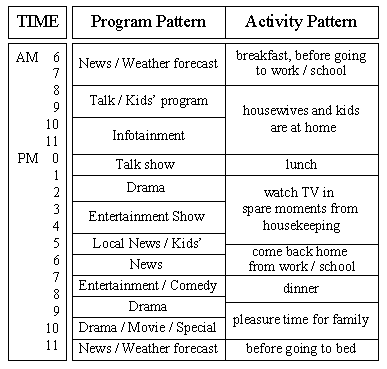
Fig. 5 Program Pattern and Activity Pattern
WebStage has a default program pattern table analogous to such real TV-program schedules. Users can modify the program pattern as they see fit. WebStage refers to the program pattern to generate a URL timetable. Groups of Web pages so derived are assigned to the appropriate time block in the timetable. After powering up (i.e. starting to run the browser), a program assigned to the current time block will emerge.
(1) Retrieval: WebStage retrieves Web pages by tracking links from given URLs by the breadth-first search.
(2) Table and Channel Planning: Reorganize the group of Web pages into channels and timetables.
(3) Staging: Like conventional Web browsers, WebStage parses Web pages written in HTML. Unlike conventional browsers WebStage reassigns media for each portion of the page contents. Then, realized programs are generated in this step. Staging is one of the most significant steps for WebStage. (4) Playback: Visual and audio output is produced for the user according to the channels or the timetable.
WebStage has many variations in staging models. Each model describes a variation. To show a page of news articles, for example, WebStage uses a "News-program" model. For a page with Q and A, "Interview-program" model would be used.
Role Section In the Role section, there is a list of roles in the program. This list stands for what kind of data are required to complete a program. Each role is a set of object types and their desired characteristics: Graphics to be displayed on the screen; sentences to be read by the text-to-speech synthesizer; strings to be shown as captions; music to be played as background music and so on. These are the objects.
There are two major types of Roles, Visual and Audio. A Visual role can be realized with one of two types of data: static graphics (e.g. GIF, JPEG, BMP, etc.) or movies (e.g. AVI, MPEG, QT etc.). Audio roles can also be realized with one of two types of data: text strings for the text-to-speech synthesizer or sound (WAV, AU etc.) for background music.
The desired characteristics of each role are referred when supplementary data are needed to be retrieved from the WebStage's supplementary-material database. For example, a "News-program" model has a role of an "Announcer", with its desired characteristics described as "suit, necktie and reliable". However, a "Comedy-program" model would also have the role "Announcer", but with the characteristics "familiar and cheerful". Figure 6 shows an example of a description of roles contained in a "News-program" model. There are twelve roles in this model.
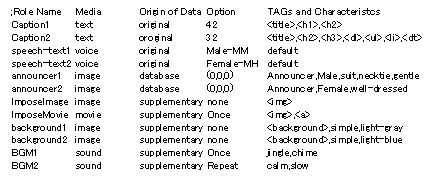
Fig. 6 An example of Role description
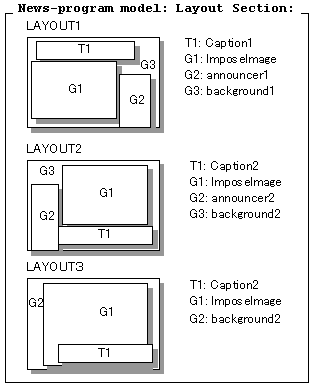
Layout Section In the Layout section, there is a list of layout templates used in the program. A layout template has information about the appearance of roles in a scene. It contains the position, size and order of each visual role, and the output volume of each auditory role is described in the layout section. A model usually has several variations in layout.
Examples of typical layouts of a scene in a "News-program" model are shown in Figure 7. There are three layout templates in the model. Each layout template contains a headline caption string and a corresponding graphic taking a dominant position on the screen. Layout1 and Layout2 include an announcer reading articles on one side. Layout3 is similar to Layout2 but the announcer is omitted and the graphics/movie block is larger. Background is not used, but a short jingle is played at low volume at the beginning of the scene.
Scene Section Control information for finding the structures of a document is described in the Scene section. The control information is a list of HTML tags referred to in order to recognize structural clusters in a document and the layout templates corresponding to the clusters. A recognized cluster is considered to be a scene and the corresponding layout template is applied to that scene.
For example, the article in Figure 2 is divided into six segments according to the paragraph boundaries. Each segment is assigned as a scene in a program. For the first paragraph, if layout1 in Figure 7 is applied, the resulting image on the screen would be as shown in Figure1.
Basic Media Arrangement Strategies Many variations of the model can be defined by tuning each section. To make it possible for users to catch the main topic of a page at a glance, the models should be defined according to the following basic guidelines:
- Text strings displayed on-screen should be short enough for the user to be able to read at a glance.
- Other text contents should be chiefly relayed to the user through the speech synthesizer.
- Visual images should be resized to an appropriate scale. (i.e. enlarged to be legible from a distance, or shrunk so it can be shown in its entirety on-screen.)
- If the original Web page does not contain any graphics for a scene, supplementary graphics should be used to help the user to understand the contents.
- Background music or sound effects should be provided to help to create an atmosphere appropriate to the information type.
(1) Model Selection: WebStage scans the content of a Web page and makes a judgment as to the type of information. An appropriate model for the page is chosen for the type. For example, a page describing sports results is evaluated as a "Game-Report" type.
(2) Page Segmentation: The whole page cannot be shown at any one time with the TV-program metaphor. Thus, WebStage divides a page into several parts. A page will be a program and the parts of which will be scenes in the program.
(3) Role Assignment: According to the model chosen in the first step, WebStage decides the roles; which graphic should be displayed on the screen, which sentence to be read by the text-to-speech engine, and which string to be shown as a caption. If roles couldn't be realized with the contents of the Web page or supplementary data WebStage holds would be used.
Figure 8 illustrates the flow of these processes.
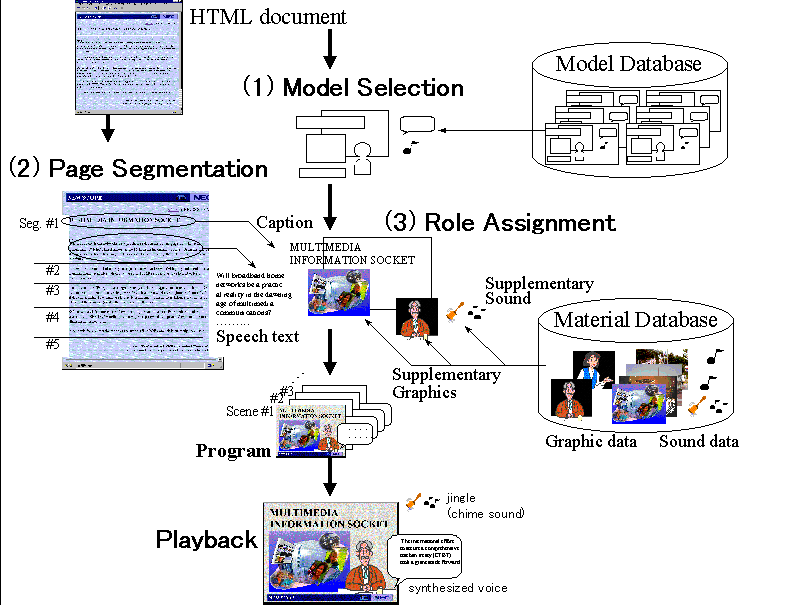
Fig. 8 Media Arrangement Process
For our first implementation, title strings with the "<TITLE>" tag, the "<H1>" tag and the "<H2>" tag are compared with the index and a model establishing the best match as the most suitable for the page. For the purposes our selection, it was efficient to choose models to be applied to stereotypical pages such as newspaper publishers' headlines and articles.
The scene section of the model describes HTML tags referred to establishing segments and which layout is to be applied to the segment. When an HTML tag described in the scene section appears on the Web page, the structural cluster is recognized as a segment. The layout for the segment is then assigned according to the description corresponding to the tag. The structure of these segments is hierarchical. When the layout of most descendant segment and its ancestors' are different, the layout of the most descendant is adopted.
According to the requirements described in the model, appropriate data is chosen from the segment of the Web page related to the scene. Although almost all of model requires graphics for each scene, Web pages usually don't contain enough number of graphics. Moreover, current Web pages seldom contain background music data.
WebStage has a database of graphics and sounds for these pages. Each graphic and sound in the database is stored with indices. The indices and text in the Web page are considered as keywords in the scene and are compared; the most appropriate with matched indices will be used to supplement the scene.
These media transformations from text into other media are expected to produce three substantial benefits.
- reducing the cognitive load of reading text.
- improving the comprehension of abstract information in a glance.
- improving the ability to distinguish between different types of information.
The transformation of text strings into speech enables the text strings on-screen to be shortened. Extracting topical strings and displaying them in large fonts helps the user to catch the topic in a glance.
Enlarged supplementary graphics considered to be related to the text data can also enhance the user's understanding of the page contents.
Background music and the layout of the screen will help to convey an appropriate atmosphere and help the user to distinguish the type of information. Moreover, appropriate use of sound and music should at as an attraction for people.
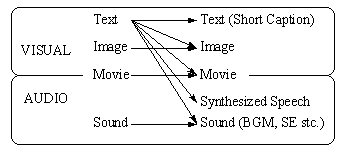
Fig. 9 Media Transformation in WebStage
The prototype currently has only 8 staging-models: one reporting-type (this is the default applied when the type of Web page is not recognized as other appropriate type); two variations of news-type model; two variations of commercial-message type model; two variations of introduction type model and one interview type model. These models are designed manually according to the previously mentioned guidelines.
We applied WebStage to various Web pages such as newspaper publishers' pages, product information pages of hardware/software venders, advertisements pages of local shopping malls and pages on galleries. It worked very well with most of them. When a page contains several associated graphics, WebStage produces the best result.
We are now on the way of quantitative evaluation about usefulness of the system. We demonstrated WebStage to more than 50 people and most of them expressed positive response. They have realized that viewing Web pages is a time consuming and a heavy task. They agreed that WebStage must help both novice and expert users to view the Web. And not a few people commented that this system must be useful not only as a personal tool but also as an information terminal in a public space.
The television metaphor has been used in database browsing by researchers in the FRIEND21 project[11]. This project was a trial to estimate the efficiency of a metaphorical interface to guide user operations. The researchers also utilized a VCR control bar to control the database browsing using the television metaphor. Their system displayed a television set and a VCR control bar on-screen. Television news and weather forecast programs were simulated to retrieve information stored in the database. The retrieved data was displayed all in text. Users could skip articles by pressing the fast-forward button on the bar, back to previously displayed articles by pressing the rewind button and so on. The aim of providing information via a news program metaphor was to enable users to guess how to use the system by making analogies with operations of a device as familiar as a television set or a VCR[7, 15]. Their goal was to guide users' operations, however, our goal is to reduce users' operations and provide information in the style of watching TV. WebStage provides a mechanism to transform the appearance of multimedia information into various television-program-like environments.
For displaying Web pages with metaphorical interface, book metaphors have been proposed by many researchers[4, 8].
A book metaphor is a natural extension of displaying structures on Web pages. Intuitive interaction methods like page-flipping are available in most book metaphor environments. However, they have focused attention at the connection structure level or higher levels of Web page linkage, whereas we have focus attention at the media structure level of a Web page's contents.
Emacspeak[13] is a speech interface which can read Web pages. Listeners can browse a Web-page like normal documents. Hypertext links are spoken in a different voice. Listeners can interrupt speech at any time and activate the most recently spoken link. This approach reduces the cognitive load on the user. If our WebStage did not display any graphics and did not play any sounds other than speech, it will be like Emacspeak.
Audible Web[1] is an approach at enhancing Web- browsers' user interface. It provides non-speech auditory cues to aid the user to more easily monitor actions on the browser and to provide feedback on user operations.
Research works concerning usability of Web page's contents are appeared recently. Guidelines for designing Web pages and evaluation results are introduced in [2, 6, 14]. If authors of Web pages follow these guidelines, it becomes more easier to understand the pages even for our WebStage. This means the guidelines gave us hints for strategies to parse HTML documents.
WebStage is a Web browser which shows Web pages in a TV-program-like format providing opportunities for passive users to access the Web as well. A user need not to stay directly in front of the computer while viewing Web pages with WebStage. This means that a user is able to view the Web, from a comfortable sofa in a living room, or while doing activities such as walking around the room, or doing other jobs concurrently.
We applied WebStage to various Web pages, such as articles produced by newspaper publishers and advertisements of shopping malls, to demonstrate that the browser enables easier Web-access for passive users. Our intention is to enable Web browsing to be as effortless as watching TV. As such, the staging models in WebStage are implemented to rearrange Web pages into a TV- program-like format. However, the models are not only limited for producing a TV-like output. The basic idea is applicable for other forms or metaphors for presenting information akin to the characteristics in each model.
2. Borges, J. A., et al.: "Guidelines for Designing Usable World Wide Web pages". In Conference Companion Proceedings of CHI '96, ACM Press, pp.277-278.
3. Brown, M.H. and Shillner, R.A.: "A New Paradigm for Browsing the Web". In Conference Companion Proceedings of CHI '95, ACM Press, pp.320-321.
4. Card, S.K.: "The WebBook and the Web Forager: An Information Workspace for the World-Wide Web". In Proceedings of CHI '96 (Vancouver, BC Canada, April 1996), ACM Press, pp.111-117.
5. Clarke, J.R.: "WWW Page Metaphor Considered Harmful". In Proceedings of OZCHI 95, University of Wollongong, pp.264-267.
6. Heller, H. and Rivers, D.: "Design lessons from the Best of the World Wide Web". In Conference Companion Proceedings of CHI '96, ACM Press, pp.350-351.
7. Hirose, M. and Asahi, N.: "Prototyping of Television Metaphor Environment"(in Japanese). In Proceedings of 2nd FRIEND21 Annual Conference, pp.21-30, 1990.
8. Miyazawa, M., et al.: "An Electronic Book: APT Book". In Human-Computer Interaction - INTERACT'90, Elsevier Science Publishers, Amsterdam North Holland, pp.513-519.
9. Mukherjea, S. and Foley, J.D.: "Showing the Context of Nodes in the World-Wide Web". In Conference Companion Proceedings of CHI '95, ACM Press.
10. Nielsen, J. and Wagner A.: "User Interface Design for the WWW". In Conference Companion Proceedings of CHI '96, ACM Press, pp.330-331.
11. Nonogaki, H. and Ueda, H.: "FRIEND21 Project: A Construction of 21st Century Human Interface". In Proceedings of CHI '91, ACM Press, pp.407-414.
12. Pillori, P., et al.: "Silk from a Sow's Ear: Extracting Usable Structure from the Web". In Proceedings of CHI '96, ACM Press, pp.118-125.
13. Raman, T.V.: "Emacspeak - A Speech Interface". In Proceedings of CHI '96 , ACM Press, pp.66-71.
14. Ratner, J., et al.: "Characterization and Assessment of HTML Style Guides". In Conference Companion Proceedings of CHI '96, ACM Press, pp.115-116.
15. Saito, N.: "Demonstration of Television Metaphor Environment Prototype"(in Japanese). In Proceedings of 2nd FRIEND21 Annual Conference, pp.31-43, 1990.
16. Yahoo, http://www.yahoo.com/
|
|