CHI 97 Electronic Publications: Papers
SenseMaker: An Information-Exploration Interface Supporting the Contextual Evolution of a User's Interests
Michelle Q Wang Baldonado and Terry Winograd
Gates 3B
Computer Science Department
Stanford University
Stanford, CA 94305 USA
+1 415 723 7784
{michelle, winograd}@cs.stanford.edu
ABSTRACT
We describe the design, implementation, and pilot study for SenseMaker,
an interface for information exploration across heterogeneous sources. We
propose supporting the context-driven evolution of a user's interests via: (1)
an approximation of the current information context as the current collection
of accumulated information references, and (2) a unified set of user-centered
actions for examining the current context and for progressing from one context
to the next. SenseMaker users examine their current context by experimenting
iteratively with different organizing dimensions and levels of granularity for
the current collection's display. They progress from one context to another by
building upon, taking away from, or replacing the current collection. They can
also return to a previous information context and continue exploring from
there.
Keywords
Information exploration, digital libraries, information seeking,
information retrieval.
© Copyright ACM 1997
INTRODUCTION
The design of any interface must begin with a good understanding of the
space of users and tasks to be supported. For information-seeking interfaces,
arriving at this pre-understanding is complicated by the fact that
information-seeking tasks can have divergent characteristics. [2] presents a
structured analysis of information-seeking tasks in terms of their goals and
the strategies used to accomplish them.
To illustrate some of these differences, we briefly consider three tasks. In
Task 1, a user hopes to find the most recent book written by Italo Calvino. He
will consider his task successfully completed once he locates this exact book.
In Task 2, a user is interested in having fun by surfing through "cool" pages
on the World Wide Web. Her criterion for success is the quality of the
experience. Finally, in Task 3, a user needs to write a term paper for a class
on Greek art. He will consider his task successfully completed if he can find a
good topic and a collection of resources on that topic.
The interface presented in this paper has been designed for tasks like Task 3.
We refer to these tasks as information-exploration tasks. More precisely, these
are tasks in which users look for new information within a defined conceptual
area. The overarching conceptual area may be at any level of granularity. For
example, the conceptual area may be as broad as "graphical user interfaces" or
as narrow as "the design of icons for the Star interface."
Three characteristics of the information-exploration task are particularly
important to consider when designing interfaces for it. First, accumulating a
collection of references helps the user to accomplish the end goal of
discovering new information. Second, the user often needs to consult multiple,
heterogeneous sources. For example, the Greek art student might consult indices
of museum holdings as well as multiple book and article indices. Third, the
evolution of a user's interests depends upon the changing characteristics of
the information context. Much evidence for the context-driven evolution of a
user's interests can be found in the literature. [1] observes that "each new
piece of information [users] encounter gives them new ideas and directions to
follow and, consequently, a new conception of the query." Similarly, [9]
observes that from search session to search session, "our searchers used data
from their present situation to determine where to go next." Both [1] and [11]
draw an analogy between information exploring and foraging. People move from
one information patch to another just as animals move from one food patch to
another.
No interface can encode all possible aspects of a user's information context.
The question is how to approximate it so that a user can more easily: (1)
examine the current context, and (2) progress from one context to the next. We
propose a lightweight approximation of information context as the current
collection of references. The fact that accumulating references is important to
the user suggests that this simple approximation will map easily onto the
user's conceptual model.
In the rest of this paper, we describe SenseMaker, an interface for information
exploration across heterogeneous sources. We begin with an overview of the
current implementation, then illustrate how SenseMaker works through a detailed
usage scenario. Next, we describe the SenseMaker design and underlying theory
at a more abstract level and show how its novel features are applicable to the
general information-exploration task. We conclude by discussing lessons learned
from a pilot study.
SENSEMAKER IMPLEMENTATION OVERVIEW
Our primary interest in implementing SenseMaker has been to learn how
users respond to a context-driven interaction model. Various versions of the
system have been available over the World Wide Web (WWW) to Stanford Digital
Library project members for the past year. It was successfully used in the
pilot study described in this paper, and it has all of the features described
in the usage scenario.
SenseMaker is a WWW server implemented in ILU (the Xerox PARC object system
implementation of CORBA) and Python. The SenseMaker back-end uses the Stanford
Digital Library InfoBus [10] to communicate in a uniform fashion with service
proxies that represent existing, autonomous services. A service proxy is an
object that responds to a standard set of remote method calls by communicating
natively with its associated service. InfoBus digital library services for
which proxies have been developed include both search services and other
information-related services. Search services used by SenseMaker include WWW
search services (e.g., AltaVista), traditional bibliographic search services
(e.g., Dialog), a map search service, and a video search service. We plan to
add search services for local e-mail archives in the near future. Two
non-search services that are important for SenseMaker are a full-text
clustering service and a Computer Science term thesaurus service.
Communication between SenseMaker and the InfoBus search services is further
facilitated by the InterOp protocol and the query translator. The InterOp
protocol allows for asynchronous communication with the search services and for
lazy materialization of the search results. The query translator [3] allows
SenseMaker to issue queries that are phrased in a general Boolean front-end
language. The query translator maps these uniform queries onto expressions that
can be understood by each of the selected native search services. In cases
where the native service does not have one of the front-end language
capabilities, the mapping is guaranteed to return a superset of the desired
results. Post-processing can then be used to prune the results as needed.
The SenseMaker front-end is based on dynamically generated HTML pages that make
extensive use of JavaScript. This choice of implementation vehicle allows for
rapid prototyping and development, but introduces some constraints to the
design process. One constraint is that design decisions that reduce display
speed or increase scrolling will hamper usability. Another is that the
interface appearance is limited to a forms-based look and feel. Users interact
with SenseMaker through the set of checkboxes, radio boxes, links, and buttons
available through HTML forms. When supplemented with JavaScript's interactive
capabilities, these widgets allow for a rudimentary form of progressive
disclosure. However, the minimality of the widget set hinders more
sophisticated interface designs. For example, SenseMaker is constrained to use
the WWW browser's menu bar rather than creating its own.
SENSEMAKER USAGE SCENARIO
Preface
Although this scenario describes the actions taken by a hypothetical
user, we have used the current SenseMaker implementation to carry out all of
the portrayed actions.
Scenario
Background
Karen is part of a team whose task is to design a distributed inventory
management system. One goal is to allow inventory administrators at different
sites to update the shared inventory database. Karen has been hearing a lot
about Java recently, and she wonders if the system interface might be written
as a Java application. Since no one on the team has any Java experience, she
decides to learn more about Java.
Initial Search
Karen logs in to SenseMaker. She is asked for a search query, an
indication of how long she is willing to wait for search results, and a
selection of search services. She enters in the keyword query java interface
and opts for a short wait. She is interested in finding both technical
articles and WWW pages about Java, so she selects a heterogeneous set of search
services that includes two technical article citation search services and four
WWW search services.
SenseMaker now sends Karen's query to all of the search services she requested.
In the short period of time granted to SenseMaker by Karen, it will not find
all possible matching results. This is what Karen wants. She is not ready to
invest the cognitive effort required to assess all possible matching results.
Furthermore, some of the search services she selected are monetarily expensive
to access. Others can take a long time to return all matching results.
Viewing the Collection
Karen now has a unified view of the heterogeneous collection of results
that match her query. In the default URL-based view, results are not listed
individually. Rather, results with URL values that refer to the same Internet
site are bundled together. Of course, the largest bundle consists of results
from the technical article citation search services (these results do not have
values for the URL field and so are bundled together). However, the next two
largest bundles contain WWW search service results whose URL values refer to
sun.com and javasoft.com.
SenseMaker presents these bundles to Karen in a table. Figure 1 shows an
excerpt of her URL-based view. Rows correspond to bundles of results, while
columns correspond to attributes of the included results. Users can change,
delete, and add columns, as well as determine how the table is sorted. [15]
discusses these and additional techniques for browsing in a multicolumn tabular
view.
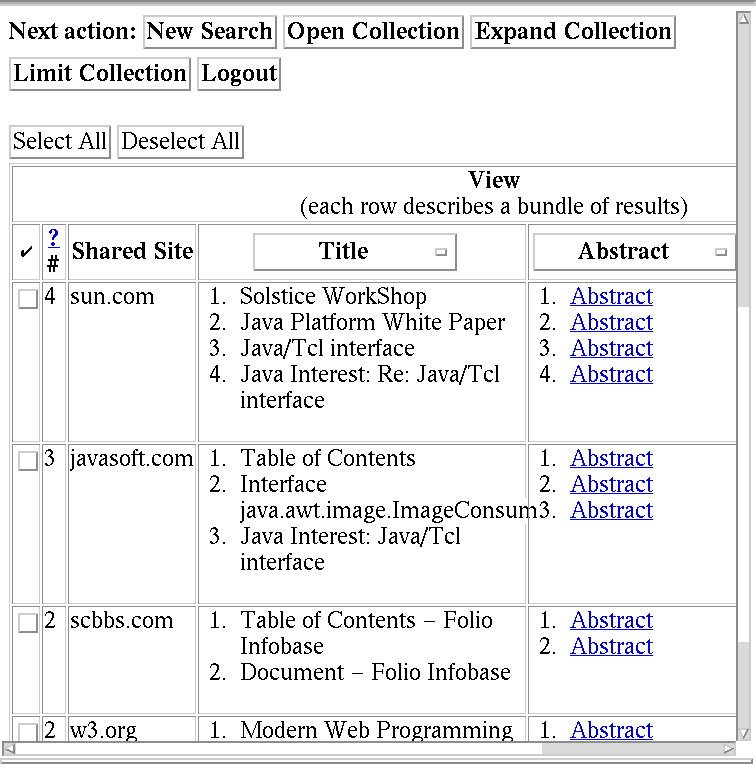
Figure 1: URL-Based View of Results.
Expanding the Collection
Karen knows that Sun and JavaSoft have made important Java contributions. Thus,
she finds the sun.com and javasoft.com bundles particularly
interesting. She decides to ask for more results that both satisfy her original
query (java interface) and have URLs that refer to these two Internet
sites. Accordingly, she selects these two bundles and clicks on the Expand
Collection button. Up pops an Expand Collection window, shown in
Figure 2.
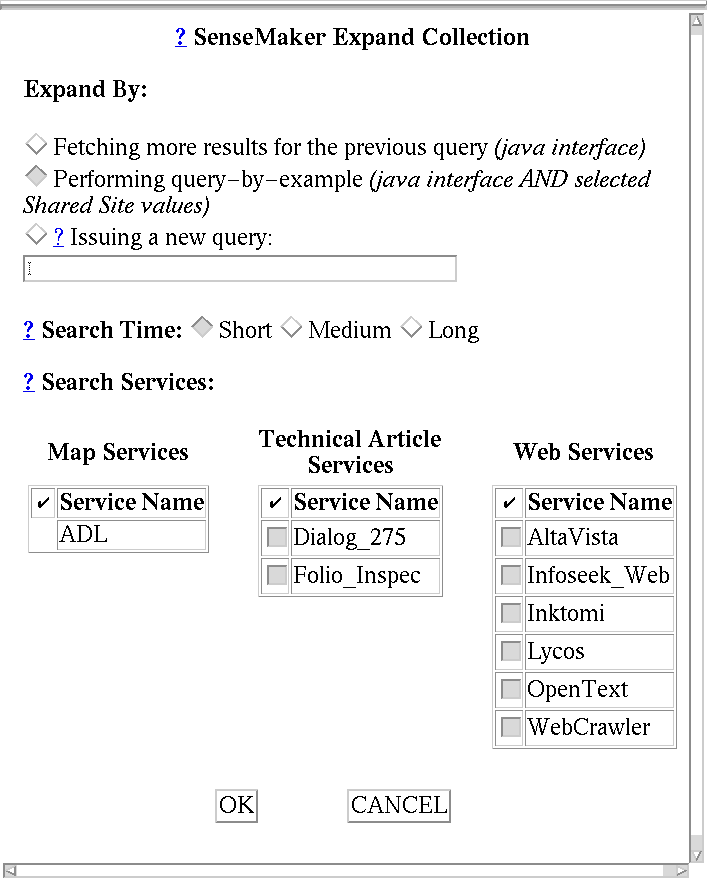
Figure 2: Expand Collection Window.
Karen chooses the query-by-example option and asks that SenseMaker look for
these additional results not only in the original search services she
specified, but in the remaining available WWW search services as well.
Duplicate Detection
Karen now has a new collection of results. It contains both her old
results and the new results she requested. The URL-based view she requested for
the last collection has become the default, and the sun.com and
javasoft.com bundles are now by far the largest. Karen quickly scans
through the titles included in these two bundles. She notices that some titles
are repeated. She clicks the Default Strategy Options... button found in
the View Controller (Figure 3) and sets her duplicate detection strategy
to Identical Title. She then turns on duplicate detection.
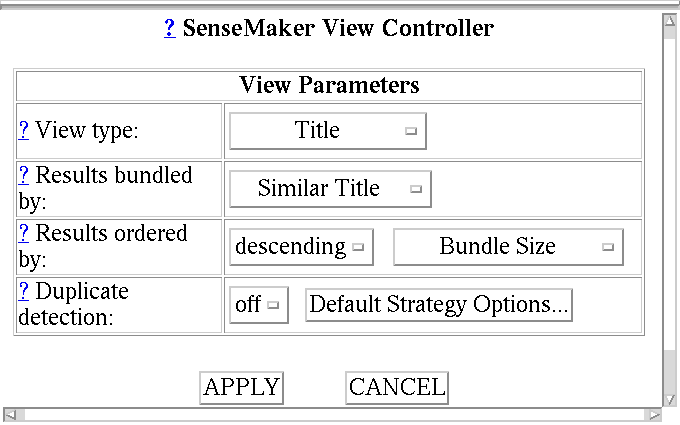
Figure 3: View Controller. Clicking on a select widget reveals the possible settings for its associated parameter.
Limiting the Collection
Karen then returns to perusing the titles in the sun.com and
javasoft.com bundles. After a little while, she decides that the only
results of interest to her right now are in the sun.com bundle. She
selects the sun.com bundle, clicks on the Limit Collection
button, and asks to limit her collection to just this selection.
Viewing the Collection
Bundling by Internet site is no longer informative for Karen since all
of the results in the new collection are in the same sun.com bundle.
Hence, she decides to use the view controller to switch to a title-based view
and to bundle together results with similar title values.
In this new view, a bundle of results labeled with the representative title
"The Java(tm) White Paper: Introduction to Java" catches her eye. Looking
inside the bundle at the included individual titles, she sees "The Java(tm)
White Paper: Security in Java." Security is an important issue for Karen's
team. When an inventory administrator performs an update on the shared
inventory database, the inventory management system needs access to several of
the administrator's local files. Karen needs to ensure that this would be
possible in a Java interface. Her interest piqued, she follows the URL for this
result and reads the paper.
Expanding the Collection Again
Certain now that she should read up more on Java security, she returns
to her collection of results and decides to augment it by clicking on the
Expand Collection button and issuing the new keyword query java
security.
Viewing the Collection
The newly created collection has both the old sun.com results and
the new java security results. Karen decides that bundling by Internet
site would once more be useful. Having switched to this URL-based view using
the view controller, she zeroes in on the princeton.edu bundle. She
follows the URLs for several of its included results and bookmarks them for
later reading.
Ending the Session
It is time now for Karen to go to a meeting. Tomorrow, she will return
to this collection to explore it some more. To ensure that she will be able to
identify this latest collection again, she labels it "Java Security" before she
goes.
Discussion
In this scenario, we have seen Karen become interested in the specific
topic of "Java security." When she returns to the task tomorrow, she may arrive
at a different interest. For example, she might decide to locate references on
"Java development environments."
What is clear about this evolution of interest is that it is fluid. Karen and
other information explorers move from one area of interest to another based
upon what they find along the way. The current information context,
approximated in this case by the current collection of information references,
plays a large role in determining what the user will do next. Furthermore,
developing an understanding of the current context is not simple. In the usage
scenario, Karen takes time at each step of the way to examine her current
collection of references. Unfamiliar with the Java area, she needs to "make
sense" of her accumulated results as she proceeds.
SENSEMAKER DESIGN FRAMEWORK
In general, the possibilities we see for future action and the ways in
which we see the past are dependent upon our understanding of the present. For
designers of information-exploration interfaces, this perspective raises
interesting issues. How can we present users with possibilities for action that
take into account their current understanding of the accumulated information
references? How can we support users in gaining a rich understanding of these
references? And how can we help users to return to collections formulated
earlier in the exploration task, once a new perspective has been gained? In the
remainder of this section, we describe how we have addressed these issues in
the SenseMaker design framework.
Examining the Information Context
As users gain access to more and more search services, the number of
results that can be returned quickly and cheaply can be quite large. Perusing
these results can be both time consuming and cognitively difficult. Enabling
users to get better overviews of their accumulated references is one of the
SenseMaker design goals. In SenseMaker, users are presented with a view of
their accumulated references. Within a view, complexity is reduced in two ways.
Similar results may be bundled together, and identical results may be merged
together. The choices of bundling criterion and identity criterion are relative
to the type of the view (e.g., author). In essence, the view type serves as the
organizing dimension for the view. This organizing dimension can be iteratively
changed by the user.
Bundling has already been used successfully in innovative interfaces for
exploring relational databases [4, 13] (where it is known as grouping or
aggregation) as well as for browsing databases of full text [12] (where it is
known as clustering). The concept of duplicate detection has also long been
important in the relational database field. As shown in Table 1, the SenseMaker
approach differs from most relational database and Information Retrieval (IR)
clustering interfaces in the extent to which it allows users to determine how
bundling and duplicate detection should be performed. In the next few sections
we will argue that this user-centered design is valuable given what we know
about user behavior.
Table 1: Differing Assumptions about how bundling and duplicate detection are performed
|
SenseMaker |
Relational Database Interfaces |
IR Clustering Interfaces |
| View type |
User specified |
User specified |
Text |
| Bundling criterion |
User specified |
Attribute value equality |
Statistical text analysis |
| Identity criterion |
User specified |
Key equality |
Identical text |
View Types
An important design precedent for the SenseMaker view type is the
traditional library card catalog with its familiar organizing dimensions of
author, subject, and title. In SenseMaker, the set of available view types is
dynamically determined by the user's choice of search services. If a user asks
to use a WWW search service, then URL becomes a possible view type. If a user
asks to use a map search service, then geographic location becomes a possible
view type. The alternative to having a dynamically determined set of view types
is to have a fixed set of view types available at all times. A fixed set is
appropriate for a customized, specialized information-exploration interface.
However, for a generic information-exploration interface, the number of
possible view types is too large for all to be included, and too little is
known about the user's information needs for an appropriate subset to be
chosen.
Bundling
In SenseMaker, choice of view type determines what bundling criteria are
available. Available bundling criteria for a URL view type include: (1)
bundling together results whose URLs refer to the same site; (2) bundling
together results whose URLs refer to the same collection at a site; and (3) not
bundling at all. For a geographic location view type, choices might include:
(1) bundling together results whose geographic locations are in the same
country; (2) bundling together results whose geographic locations are near to
each other; and (3) not bundling at all.
Examples of using different bundling criteria can be found in our scenario.
Initially, Karen had a URL-based view that bundled together results with URLs
referring to the same Internet site. Later on, she switched to a title-based
view that bundled together results with similar title values. As these examples
show, users find different bundling strategies useful at different times.
Relational database languages, with their built-in and oft-used constructs for
grouping by attribute equality, also give strong evidence for this need.
Duplicate Detection
In SenseMaker, users can determine the criterion used for duplicate
detection just as they can determine the criterion used for bundling. This
flexible duplicate detection policy is novel to SenseMaker. In general, users
are not likely to change the duplicate detection criterion as often as they
change the bundling criterion, but the principle remains the same as for
flexible bundling. Moreover, [6] presents some philosophical reasons for why
identity criteria should not be fixed and observes that "sameness is
contextually determined, a judgment based on use."
As examples, consider three different users performing different tasks. User A
is doing a survey of a particular area (much like Karen). She considers results
with identical title values to be duplicates. User B is trying to see how well
indexed a particular item is. He considers results with identical titles to be
unique items, as long as they come from different search services. Finally,
User C is checking to see if there have been copyright infringements on a
particular work. She considers results with identical full texts to be
duplicates, regardless of their title values.
Progressing from One Information Context To the Next
SenseMaker users can request that various features of the accumulated
references be used to govern the progression from one information context to
the next. Progression is equivalent to building upon, taking away from, or
replacing the collection of accumulated information references. We describe
here a sampling of the specific ways in which progression might take place. We
refer to these possibilities as expand actions, limit actions, and replace
actions. Most, but not all, are currently available in SenseMaker. Those
actions that are not yet in SenseMaker will be added in the next round of
implementation.
Expand Actions
- Expand by issuing a query-by-example. In the usage scenario,
Karen initially gave SenseMaker the keyword query java interface. She
then looked at her results through a URL-based view that bundled together
results whose URL values refer to the same Internet site. She decided the
sun.com and javasoft.com bundles were particularly interesting
and asked SenseMaker to find more results that both satisfied her original
query and that had URLs that referred to these two Internet sites.
We label this strategy for expanding a collection query-by-example.
Karen is able to specify how the collection should be expanded simply by asking
that two bundles serve as examples of what she needs. The Expand Collection
window makes it clear to Karen how her action is interpreted by
articulating that the query specification issued by SenseMaker will be: java
interface AND selected Shared Site values.
In the SenseMaker framework, two styles of query-by-example are
possible. The action requested by Karen illustrates one such style. The results
to be added to the collection must both satisfy the original query and share
the defining characteristic of the example bundles.
In the second style of query-by-example, the results to be added to the
collection are no longer required to satisfy the original query. This is useful
for the user whose interest has evolved to the extent that it is now unrelated
to the original query. For example, consider a user who has issued a query
specifying a particular subject. After viewing the matching results through an
author-based view and reading a few abstracts, the user might become interested
in the perspective offered by one or two specific authors. In that case, the
user might wish to find out what else those authors have written, independent
of the particular subject named in the original query. A simple way to do this
is through a query-by-example action whose results are not constrained
to match the current query.
The SenseMaker query-by-example is novel, but is related both to the
relational database concept of query-by-example [13] and to the IR concept of
interactive relevance feedback [5]. In a typical relational database
query-by-example scenario, a user interacts with a tuple visualizer to give a
partial specification of the tuples to be found. SenseMaker
query-by-examples are different in that the user gives full instantiated
representatives of what is to be found. The user relies upon SenseMaker to
formulate the corresponding partial specification.
In a typical relevance feedback scenario, a user interacts with the
system by identifying which of the initially returned documents are relevant.
The system then retrieves documents that are statistically similar to these
documents. In our framework, relevance feedback can be viewed as a SenseMaker
query-by-example action in which the examples are the full texts of
individual results rather than bundles of results. What is novel about the
SenseMaker action is that it gives the user the option of specifying
bundle-level characteristics, not just document-level characteristics, as the
grounds for finding additional references.
- Expand by asking for related references. In query-by-example
actions, results are added to the collection if they are similar to the given
examples. A variation on query-by-example is to add results if they
stand in a defined relation to the given examples. In [7], these relations are
understood as growth sites in the information landscape. We call the
type of expand action that relies upon these relations a related-reference
query.
We illustrate this strategy with a few examples. (1) A user is looking at
results that come from technical article search services through a view that
bundles together results referring to the same author. A related-reference
query might add in results that are by the selected authors' colleagues.
(2) A user is looking at results through a view that bundles together results
referring to works on the same topic. A related-reference query might
add in results that are on topics similar to the selected topics. (3) A user is
looking at individual results. A related-reference query might add in
results that are cited by (or that cite) the selected individual results.
The above examples of related-reference queries illustrate the
importance of having an architecture that allows SenseMaker to consult with
external sources. For example, to find results that cite the selected results,
SenseMaker might first check with a citation index such as the Science Citation
Index. The feasibility of such an approach is demonstrated in [7], which
describes an interface that takes the current set of documents and presents the
associated citation information in a novel way.
- Expand by issuing a new or refined query. In the scenario, Karen moved
from specifying her interest as java interface to specifying it as
java security. However, she did not want to lose sight of the references
already found through the java interface query. Thus, she found it
useful to expand the collection by issuing a new query, the results of which
were added to her current set of results. This is different from launching a
new search because Karen can see the new results integrated with her old
results.
SenseMaker can assist the user in formulating the new query by providing
suggestions for refining the previous query. Currently, SenseMaker makes
suggestions by consulting with an external service that lists synonyms, and
then allowing the user to refine the query to include these synonymous terms.
- Expand by enlarging the scope of the previous query. This final expand
action is one that is found in many current search interfaces. Having received
results for a particular query, the user is able to ask for more results for
that query. The slight wrinkle added here is the ability to extend the query to
new search services at this point.
Limit Actions
- Limit by focusing on selections. At one point in the usage
scenario, Karen limits her collection to just the sun.com and
javasoft.com bundles. This action illustrates limiting by focusing on
selections. The user determines how the collection should be limited by
explicitly indicating which bundles (or individual results) should be kept.
- Limit by issuing a query over the current collection. An alternative
way to limit a collection is to issue a filter query over it. For example, a
user might decide to limit a collection to just those results that are
post-1995.
Replace Actions
In a replace action, the current collection is erased and a new
collection is substituted in its place. Clearly, a straightforward way in which
to replace a collection is to issue a brand new query. However, variations on
all of the expand action possibilities could be used as the means to produce a
new collection. The only difference in the replace action is that the new
results are not added to the old collection, but rather are added to an empty
collection.
Expand, Limit, and Replace Actions in the Interface
Given that a context makes available a wide variety of possibilities for
action, the question arises as to how to present all of these possibilities to
the user. In the current implementation, we use progressive disclosure to
reduce clutter in the interface. When ready to move to a new context, the user
indicates whether the next action will be an expand, limit, or replace action.
Only then do we present the specific action choices that correspond to the
indicated action type.
Returning to Previous Information Contexts
There are several arguments for why a user needs the ability to return
to a previous context. One argument is that each context offers a plethora of
possibilities for action, making it likely that a user might wish to pursue
more than one of these alternatives. Allowing the user to perform multiple
actions at once leads to problems of divided attention. The ability to return
to previous contexts and continue exploring from there seems a better solution
to this problem. Another argument is that a user often needs to continue the
information-exploration task over multiple sessions, and accordingly must be
able to return to a previous context. An example of this need surfaced in the
usage scenario, where Karen planned to continue her task the next day.
In the SenseMaker framework, returning to a context is equated with returning
to an earlier collection of information references. In an
information-exploration task, the number of collections created can grow to be
quite large. To facilitate browsing through the list of created collections,
SenseMaker provides the user with the day/time at which the collection was
created, a brief description of how it was created, and a user-provided label
if one is available. Figure 4 shows what a list of created collections looks
like to the SenseMaker user.
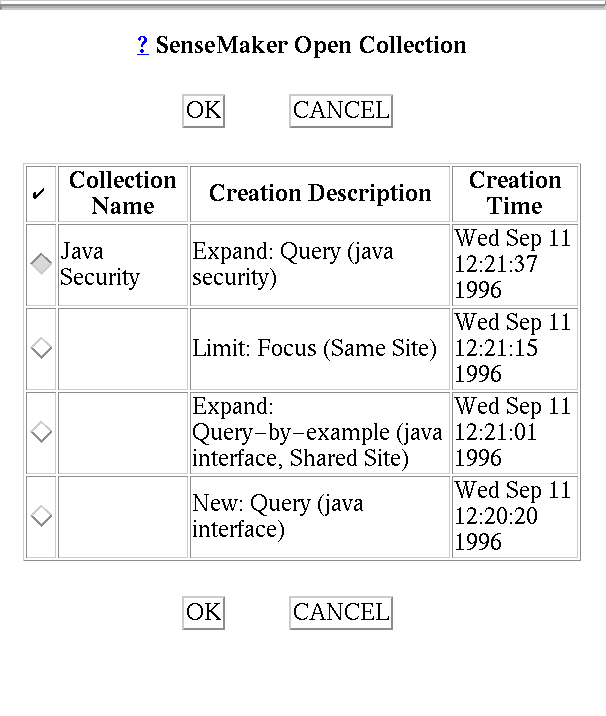
Figure 4: Open Collection Window.
SENSEMAKER PILOT STUDY
As a whole, the Stanford Digital Library project has targeted users
interested in the computing literature. Thus, many of the available search
services available to SenseMaker through the InfoBus are computer-related.
Consequently, we have continued to focus on this specific user population,
despite its unusual characteristics.
Participants in the Stanford Digital Library project include librarians, HCI
researchers, database researchers, and Artificial Intelligence researchers.
These participants fit our target user profile. Ongoing feedback from project
members has led us to develop new versions of on a regular basis. However,
these interactions have not been sufficient to answer the question of how well
the various SenseMaker features work in practice. To answer that question will
require a rigorous set of user studies. In this paper, we present a pilot study
initiated to gain a preliminary sense for how users respond to the system and
to pave the way for future studies.
Pilot Study Part I
Description
Five subjects, all with Computer Science backgrounds, participated in
Part I of the pilot study. Each subject performed two different tasks using two
different versions of SenseMaker (version presentation order was varied
randomly). Before each task, each subject received a short introduction to the
appropriate version of the interface. At the end of both tasks, each subject
participated in a structured interview about his/her experiences.
Version 1 of SenseMaker was the interface described in this paper. Version 2
was a baseline system developed for comparison purposes. It is similar to other
existing systems that allow users to access multiple search services (e.g.,
[14]). Specifically, Version 2 limited users to just one default view of the
accumulated results. Within that view, results were listed individually
(exactly as they would have appeared in a Version 1 view that had bundling
turned off). Furthermore, in Version 2 the only permissible actions after
viewing a collection were: (1) Start a new search; or (2) Get more results for
the current search.
Written instructions for each task informed the subjects that they were about
to write a term paper on a topic of their choice for a graduate level seminar
(a cryptography seminar for Task 1 and a neural networks seminar for Task 2).
The subjects were then given 15 minutes in which to determine the specific
topic and to write down the titles of one or two promising references. Subjects
were limited to references that could be found by using the interface
directly.
Lessons
We discovered that most subjects did take advantage of having a
collection as a starting place from which to perform their next action. For
four out of the five subjects, expand and limit actions accounted for at least
50% of the actions taken in Version 1. Tables 2 and 3 show the breakdown of
actions taken by the study participants.
Two subjects mentioned explicitly that they found the limit feature useful
because it helped them to pare their collection down. One user articulated a
need for the second style of query-by-example (not included in the current
implementation). All of the users noted that they liked having the ability to
return to previous collections, even though they did not have time to do so
during the 15-minute time period.
Table 2: Version 1 Collection Action Percentages.
|
User 1 |
User 2 |
User 3 |
User 4 |
User 5 |
| Replace/New Query |
25% |
50% |
25% |
56% |
17% |
| ExpandMore |
25% |
25% |
|
22% |
|
| Expand/New Query |
25% |
|
13% |
22% |
33% |
| Expand/QBE |
25% |
|
13% |
|
|
| Limit/Focus |
|
25% |
37% |
|
50% |
| Return |
|
|
13% |
|
|
| Total # Actions |
8 |
4 |
8 |
9 |
6 |
Table 3: Version 2 Collection Action Percentages.
|
User 1 |
User 2 |
User 3 |
User 4 |
User 5 |
| Replace/New Query |
82% |
100% |
82% |
80% |
100% |
| ExpandMore |
18% |
|
18% |
20% |
|
| Total # Actions |
11 |
3 |
11 |
5 |
5 |
In the follow-up interviews, users expressed uncertainty about the value of
bundling. Several mentioned that they did not have enough time to try changing
views, and that changing views was not necessary for the small number of
results they accumulated. Thus, we could not get a sense of the value of
changing views or of query-by-example (which relies upon bundles). We initiated
Part II of the study to focus explicitly on views.
Pilot Study Part II
Description
Four subjects, all with Computer Science backgrounds, participated in
Part II (only one user did both Part I and Part II). For this part, we obtained
two large collections of results by issuing the queries "cryptography" and
"neural networks" to two Web search services and two technical article citation
search services, asking for 100 results apiece for each query. We then produced
three views of each collection.
In each view, results were presented in an HTML table, just as they are in the
SenseMaker interface. Columns corresponded to title, author, and URL. In View
1, each row corresponded to a single result. In Views 2 and 3, each row
corresponded to a bundle of results, where bundling was by same author for View
2 and by same site for View 3.
Subjects looked at each collection view for two minutes (view order was
determined randomly, but stayed the same for the two collections). After each
view, subjects reported their impressions of the collection. After finishing
with each collection, subjects were asked to rate the views for usefulness on a
scale of 1-10 and to describe what they found useful about each view.
Lessons
The ratings given by the subjects to the views were highly variable. We
abstracted from these ratings to obtain the rank order of each view for each
user/collection pair. Each of the three view types received a top ranking from
some user/collection pair. Furthermore, two of the users changed their ratings
from one collection to the next to such an extent that their rank order of the
views changed between collections. Overall, Part II suggests that users do in
fact find different views informative for different reasons.
CONCLUSIONS AND FUTURE WORK
We have presented SenseMaker, an interface for information explorers who
consult heterogeneous search services. SenseMaker has been designed to help
these users examine their current context and to progress from one context to
the next. We have approximated information context as a collection of
information references. This approximation has allowed us to: (1) equate
examining context with viewing the collection from different perspectives; and
(2) equate progressing from one context to the next with building upon, taking
away from, or replacing the current collection.
In Part I of our SenseMaker pilot study, subjects did in fact use the expand
and limit actions to progress from one context to the next. In Part II,
subjects had different opinions about which view was most informative.
Accordingly, Part II supports the idea that users should be able to obtain
different views of their collections.
Our pilot study has suggested areas for future work and more rigorous study.
Most users in Part I reacted favorably when asked about some of the action
possibilities that were discussed in this paper but not yet implemented. In the
next version of SenseMaker, we will incorporate these actions. Also in response
to user feedback, we plan to implement a Java-based graphical version of the
interface. In terms of future studies, we plan both to perform studies that
allow more careful evaluation of individual aspects of the interaction and to
perform a second version of Part I with more subjects, each of whom will spend
a longer period of time interacting with SenseMaker.
ACKNOWLEDGMENTS
This work is supported by the National Science Foundation under
Cooperative Agreement IRI-9411306. Funding for this agreement is also provided
by DARPA, NASA, and the industrial partners of the Stanford Digital Libraries
Project.
Steve Cousins and Andreas Paepcke gave us insightful comments on early drafts
of this paper. Scott Hassan's contributions to the Digital Library project
infrastructure and Kevin Chang's development of the query translation module
made the implementation of SenseMaker possible.
REFERENCES
- Bates, M.J. The design of browsing and
berrypicking techniques for the online search interface. Online
Review 13, 5 (October 1989), 407-24.
- Belkin, N., Cool, C., Stein, A., and Thiel,
U. Cases, scripts, and information-seeking strategies: on the design
of interactive information retrieval systems. Expert Systems with
Applications 9, 3 (1995), 379-395.
- Chang, K., Garcia-Molina, H., and Paepcke,
A. Boolean query mapping across heterogeneous information
sources. IEEE Transactions on Knowledge and Database
Engineering 8, 4 (August 1996), 515-521.
- Goldstein, J., and Roth, S. Using
aggregation and dynamic queries for exploring large data sets, in
Proceedings of CHI '94 (Boston MA, April 1994), ACM Press,
23-29.
- Koenemann, J., and Belkin, N.
A case for
interaction: a study of interactive information retrieval behavior and
effectiveness, in Proceedings of CHI '96 (Vancouver Canada, May
1996), ACM Press, 205-12.
- Levy, D. What do you see and what do you get?
Document identity and electronic media, in Screening Words: User
Interfaces for Text, Proceedings of the Eighth Annual Conference of
the UV Centre for the New OED and Text Research (Waterloo Canada,
1992), 109-117..
- Mackinlay, J.D., Rao, R., and Card, S.
An organic user interface for searching citation links, in Proceedings
of CHI '95 (Denver CO, May 1995), ACM Press, 67-73.
- Mann, T. Library Research Models: A Guide to
Classification, Cataloging, and Computers. Oxford University
Press, New York, 1993.
- O'Day, V., and Jeffries, R. Orienteering in an
information landscape: how information seekers get from here to there,
in Proceedings of INTERCHI '93 (Amsterdam, April 1993), ACM
Press, 438-445.
- Paepcke, A., Cousins, S., Garcia-Molina, H.,
Hassan, S., Ketchpel, S., Röscheisen, M., and Winograd, T. Using
distributed objects for digital library interoperability. IEEE
Computer Magazine 29, 5 (May 1996), 61-68.
- Pirolli, P., and Card, S. Information
foraging in information access environments, in Proceedings of CHI
'95 (Denver CO, May 1995), ACM Press, 51-58.
- Pirolli, P., Schank, P., Hearst, M., and
Diehl, C.
Scatter/Gather browsing communicates the topic structure of
a very large text collection, in Proceedings of CHI '96
(Vancouver Canada, May 1996), ACM Press, 213-20.
- Sawyer, P., and Mariani, J. Database systems:
challenges and opportunities for graphical HCI. Interacting with
Computers 7, 3 (1995), 273-303.
- Selberg, E., and Etzioni, O. Multi-service
search and comparison using the MetaCrawler, in Proceedings of the
Fourth International World Wide Web Conference (Boston MA,
December 1995). Full text.
- Wake, W., and Fox, E. SortTables: A browser for
a digital library, in Proceedings of the Fourth International
Conference on Information and Knowledge Management (Baltimore MD,
December 1995), 175-81.
CHI 97 Electronic Publications: Papers