


|
|
FX Palo Alto Laboratory
3400 Hillview Avenue, Bldg. 4
Palo Alto, CA 94304 USA
+1 415 813-7574
wilcox@pal.xerox.com
*Speech Interface Group
MIT Media Laboratory
Cambridge, MA 02139 USA
+1 617 258-5956
nitin@media.mit.edu
Although computers have proven adept at all manner of data processing, paper is still generally preferred over PDAs and portable computers for note-taking. Studying paper notebooks helped us to understand the affordances of paper [13] where freeform input, spatial layout, and even doodles (for their visual cues) are an integral part of the note-taking process. The approach taken by Dynomite is to enhance the traditional paper note-taking activity rather than define a new process as personal organizers and portable computers do. In contrast to Classroom 2000 [1], which supports note-taking in a classroom lecture using previously made visual materials (view-graphs), our target is note-taking for any knowledge worker, anyplace.
The design of a portable electronic notebook must address a number of issues. First, what qualities of paper notebooks are important to emulate in an electronic version, and which can we improve upon? Second, since people use notebooks in meetings and at times when they must concentrate on things other than the note-taking process, how can our system obtain keys for indexing while maintaining a low cognitive load? Next, how can we use a computer to help organize and display the information in a notebook? Finally, how can audio augment handwritten notes on devices with limited storage?
Our design provides new solutions in the four problem areas above. An important aspect of paper notebooks is their ease of use. The interface to Dynomite is similar to a standard paper notebook. Users see a screen with the appearance of a page in a traditional notebook and enter freeform hand-written notes that are stored as digital ink. The Tivoli [12] system is similar, in that it emulates whiteboard functionality on a Liveboard. Microsoft's aha! Inkwriter [9] mimics a word-processor by reformatting ink to fit the columns of a page, and allows users to edit handwritten notes. Users of the Paper-based Audio Notebook [14] take notes on paper placed on a digitizing tablet, thus allowing notes to be linked to recorded audio.
Dynomite achieves low cognitive load by using ink without recognition during the note-taking process. However, the lack of text input exacerbates the problem of obtaining keys for indexing. We take a two-fold approach. First, Dynomite allows users to associate properties, or data types, such as "To Do" or "Name," with a collection of digital ink. Second, Dynomite allows the user to assign text keywords to a page of notes. While Filochat [16] provides a notebook structure for handwritten notes, it does not address the problem of indexing and retrieval.
Another problem Dynomite addresses is notebook organization. Typically users take notes chronologically on a number of topics and thus actually have a number of distinct topic threads running through one notebook. Dynomite has the ability to retrieve subsets of the notebook by specifying dates, properties, and keywords. The user sees these retrieval results as a view on the notebook, analogous to views in a database system. Users may define and revisit notebook views thereby providing a dynamic organization of the changing content of the notebook. Erickson's Proteus laptop notebook [4] and Classroom 2000 [1] have keyword retrieval, but only over text-based content.
Finally, Dynomite explores the use of audio to augment handwritten notes on devices with limited storage. Audio is recorded continuously and synchronized with the digital ink, but only those portions of the audio highlighted by the user are permanently stored. Users decide whether the non-highlighted audio is deleted or compressed. While Notetime [8], Filochat [16], Coral [10] and others [1,14,15] record audio synchronously with handwritten notes, they do not address the audio storage issue.
These four sets of features provide many of the benefits of both paper and computer note-taking systems. The next section covers a study on notebook usage that helped inform the design of the system. Following that we describe our current implementation of Dynomite. Next we report on a pilot Dynomite user study, followed by conclusions.
We interviewed people in their offices with their notebooks at hand. The sessions were video-taped for later analysis and lasted approximately one hour. We asked people a variety of questions on their note-taking practices, and had them show us illustrative examples from their notebooks. The interviewer first inquired about the types of notebooks they used, the ways in which they took notes, and how they used notes over time. We asked about the potential of audio as an enhancement to the handwritten notes. Finally, we asked about their frustrations with their current notebooks and their ideas for an ideal notebook.
A few people used PDAs and notebook computers in addition to their paper notebooks. PDAs found utility mainly for calendar items or short "To Do" items. Notebook computers were used mainly for typing notes during travel. However, people preferred handwriting to typing, saying that it was easier to listen while writing than while typing.
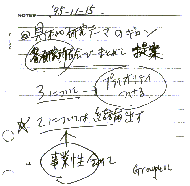
Figure 1: A sample notebook page showing circled "To Do" items and underlined text (in Japanese).
People occasionally needed to retrieve specific information from their notes. This information was typically a name, a telephone number, or a URL. People reported searching for this type of information chronologically. Thus they would estimate where a certain date might be in their notebook, and then search using the dates written on the pages. In these cases, marks made during recording were as helpful for retrieval as for review. For example, topics and names marked with circles or asterisks, or placed in a special position such as the top or side margin, aided this search.
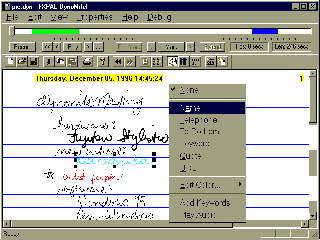
Figure 2: Dynomite notebook page showing ink properties (in color) and ink written during audio highlights (in bold). Highlights are also shown as bars on the audio time line. The property "Name" is being applied to the ink selection.
Based on our notebook usage study, we designed and implemented the Dynomite system to augment and enhance existing note-taking practices. Our design goal was to include support for free-form input for arbitrary structure, marking of key items, and versatile retrieval. In addition, we wanted to explore the potential of adding audio to the traditional note-taking process.
Pen strokes are entered on a page of notes and are stored in a structure which includes their time-stamp and property. Pen strokes are clustered by time, so that strokes created sequentially without a pause are grouped. Several gestures are available to assist with the input, as in Tivoli [12]. An insertion gesture creates more space above and below the point of insertion, a delete gesture deletes the last group of strokes, and an undo gesture repeatedly reverts the last change. A horizontal line gesture causes a new page of notes to be created, as in the Marquee [15] video annotation system. Additionally, groups of strokes can be selected and dragged to arbitrary locations on the page.
Properties are information types associated with selected ink, analogous to data types in a programming language. Properties are associated with ink and not with the entire note page, so that the item can be easily identified on a page and also so that all ink with a particular property can be retrieved and shown at once. This use of properties for retrieval is quite different from "color" and "thickness" ink properties in most drawing programs.
Properties are effective because it is easier for users to select the type of information than to describe its content. Dynomite has a default set of properties, which include "To Do" to indicate that the note is a reminder for the user to perform a particular task, "Name" to indicate that the note is the name of a person, and "URL" to indicate that the note is a WWW address.
Properties can be assigned to notes either before or after the ink is written. If the user knows he is about to write a note with a certain property, he can select that property from the property menu and begin writing. Properties are indicated to the user by the color of the ink. After writing, properties can be assigned to ink by selecting the desired strokes and choosing a property from the menu. Pen strokes can be selected in two ways. First, the user may click near a stroke, causing all strokes in the same time-grouping to be selected. Alternately, a group of strokes can be selected by dragging a selection rectangle. Figure 2 shows the property "Name" being assigned to a selected group of strokes.
Another way to assign properties is by using a template note page. In this case ink written in pre-defined regions is automatically given specific properties. For example, a template note page could be defined with a box for "To Do" items or with a region along the left-hand margin for keywords, as suggested by practices observed in the usage study. Another example is a note page template for telephone messages with regions at the top of the page for name and telephone numbers.
In addition to properties, Dynomite allows text keywords to be associated with a page of notes. This enables keyword-based retrieval. In contrast to properties, which describe the type of information contained in the note, keywords describe the content. Because keywords reflect more general information, they are assigned to the entire note page and not to a particular bit of ink. Text can be entered in several ways. One, keywords can be selected from a list of previously entered keywords. Two, keywords can be typed using a pop-up keyboard. Three, keywords can be written in a keyword entry box and recognized using handwriting recognition software. Keyword indexing is also used in Marquee [15].

Figure 3: A table of contents showing note pages' creation and modification date, properties (icons) and keywords.

Figure 4: Retrieval toolbar requesting all notes with "To Do" property and keyword "wireless"
In order to help users find and organize information in their notebook we introduce the notion of views. A view is a subset of the notebook content selected by a query based on time, properties, and keywords. Dynomite views are analogous to views in a database system; they display subsets of the records. Figure 4 shows the interface for creating a view, which currently allows query by property and keyword. In this case, the user is retrieving all note pages with "To Do" items that have the keyword "wireless." The view is displayed to the user in one of two ways. If the user presses the "Table of Contents" button in the view interface (see Figure 4), a table of contents is displayed as in Figure 3, except that only those notes satisfying the query are included.
If the user presses the "Ink Index" button, an index page is created by extracting from each note retrieved by the query that ink with the selected properties, and laying it out on a new page. The creation date of the ink is added as a caption. Figure 5 shows the ink index page for the view specified in Figure 4. It presents on a single page all notes with the "To Do" property on pages with the keyword "wireless", allowing the user to quickly view all relevant information. In addition, items on the index page are hyper-linked back to the original notebook page in case more context is needed.
Once a user has gone to the effort of creating a view, they may store it for later reuse. In this way, users create virtual notebooks presenting a subset of the notebook contents and revisit them to find the information they need.
When enabled, audio is recorded continuously and time stamped synchronously with the pen strokes, similar to other systems [8,10,16]. However, since Dynomite is intended to run on mobile devices, which do not have much storage, only those portions of the audio "highlighted" by the user are stored permanently. In contrast to the audio-only device of Degen et al. [3], in which marks are created at a single point in the audio, Dynomite highlights can be created for variable length audio segments.
The motivation for highlighting is the observation that users tend to manage audio by creating marks that identify important passages [16]. In one system [11] the user wrote "HA" (for "hear audio") in the notes whenever interesting audio occurred. Our goal was to move from implicit marks about important audio passages to explicit marks that the system can understand. This has two advantages. First, it provides a means for the computer to make informed decisions about audio storage reduction. Second, highlights act as indices into the audio in cases where no notes have been taken.

Figure 5: Ink index page for the keyword "wireless" and the property "To Do."
Users initiate audio highlighting by pressing the "Mark" button shown in Figure 2, or by drawing the highlighting gesture. The audio highlighting starts a fixed amount of time in the past (as suggested by people in the note-taking study) and remains on for a fixed amount of time. Both the start offset and duration can be set by the user. The user can press the "Extend" button, to extend the length of time that the audio is highlighted, or can end the highlighting by pressing the "End Mark" button, or can simply let the audio highlight period run out. The Listener [6] system uses a different approach to allow saving of audio segments from a telephone conversation. We are investigating how to automate the audio highlighting process by recognizing the audio characteristics of a specific speaker or speakers. For example, highlighting may be turned on when the notebook's owner is talking. This can be done using a speaker segmentation algorithm [17].
Research has shown that one difficulty with audio is the fact that it is not visible [5]. Thus, Dynomite indicates audio highlighting to the user in two ways. First, pen strokes made during highlighted audio are displayed in bold (see "Fujitsu Stylistic" in Figure 2). Second, a horizontal timeline shows regions of highlighted audio as colored horizontal bars, similar to previous audio displays [2,7]. This provides a visual display of the entire audio recording period and the highlights within the period. This interface allows access to audio when no notes have been taken and, as described below, it also serves as an interface to edit and play highlighted regions after recording.

Figure 6: Audio toolbar showing timeline, highlighted regions of audio, plus controls for playing, recording, editing, and highlighting.
Figure 6 shows a close-up of the timeline and controls for highlighting and playback of audio. Users play audio by positioning the audio cursor on the timeline and pressing the "Play" button. The arrows adjacent to the "Play" button skip the audio to 1 or 5 seconds ahead or behind the current position. The user can also play only highlighted regions and can skip between these regions. Editing a highlighted region is performed by pressing the "Edit Mark" button, and dragging the endpoints of the highlight to the desired position. When satisfied with the editing, the user can store the notes, at which point non-highlighted audio is either deleted or compressed.
Storing only highlighted audio requires less storage space which is important for a mobile device. A more subtle advantage is that it serves to de-couple ink and recorded audio. For example, if users have no interest in the current topic of discussion, they may want to refine notes taken previously in the meeting. In this case, it is unlikely that they want the current audio linked to these notes.
People directed some comments at the hardware -- Dynomite is currently implemented on a Fujitsu Stylistic-1000 running Microsoft's Windows 95 and Pen Services. The screen is somewhat small, the viewing angle is limited, and there is a slight delay between the time a stroke is written and when it appears on the screen. However, users had no major difficulty taking notes with this hardware, and commented that they liked the feel of writing on the device.
People liked the editing capabilities provided by Dynomite, in particular the ability to delete selected pen strokes and the ability to move notes from one place to another. One person commented that he particularly liked the ability to shift existing notes down the page and to insert a new note into this space. He said this "made his notes better organized."
One issue raised by all users was stroke grouping and selection. Currently, strokes made within a short time of one another are automatically grouped. Selection of any stroke in the group causes selection of the entire group. This is advantageous in some respects, since it makes for easy selection of words and phrases. On the other hand, it is not yet possible to select individual strokes from the group, so for example, you cannot delete one word from a grouped phrase. One user realized this, and changed the pace of his note-taking accordingly. However, in the future, we will allow for spatial as well as temporal grouping.
Our default set of properties consists of "Name", "Telephone", "To Do", "Keyword", "Quote", and "URL". However, people wanted to define their own properties. For example, one user wanted a property for "Ideas", for ink that refers to ideas for future work, or "Expenses" for ink about business expenses. Another user wanted a property "Headings." He suggested this would be used for viewing an outline of notes; retrieval would show an ink index page with only "Heading" ink. In the future we plan to allow users to define their own personal properties.
The users were able to turn the highlighting on and off, using the "Mark," "Extend" and "End Mark" buttons, whenever the topic occurred in the video. Highlighting seemed to be a low enough overhead task, so that users took notes as usual. All questions were answered from the highlighted audio or the handwritten notes. This indicates that given a task where users can identify the important information, there is no obvious disadvantage to employing audio highlighting.
Our experience corroborated two findings from Filochat [16]. First, people appeared to be learning to take fewer handwritten notes and rely more on the audio. Second, people wanted to improve their handwritten notes afterwards by playing back portions of the audio. Dynomite facilitates this task by allowing users to visually navigate the audio using the audio timeline and also to automatically skip from highlight to highlight in playback mode.
The Dynomite system addresses these issues with a coherent set of features. First, Dynomite provides a paper-like interface using digital ink with editing capabilities. We avoid interactive handwriting recognition because it interferes with note-taking. However, this exacerbates the problem of obtaining keys for indexing. Thus Dynomite provides properties to easily describe the data-type of some ink, and keywords to describe the content of a note page. Keywords and property indices can be used to create views, or subsets, of the notebook. These virtual notebooks provide an organization that automatically updates as new note pages are added. Additionally, Dynomite provides explicit audio highlighting, allowing the system to make intelligent decisions about storage management and allowing users to visually navigate through important audio segments.
Although our user studies are far from complete, we are encouraged by our observations thus far. The basic Dynomite interface is easy to use. Properties are fairly natural to apply, and their potential usefulness in review and retrieval was noted. Views seem to address a generic problem of chronological notebooks: having multiple topic threads interspersed throughout. To be sure, the audio highlighting feature is most beneficial when people can recognize important audio. However, anecdotal evidence from our users indicates that people do realize, although perhaps with some delay, when an important audio event has occurred.
We are currently planning longer term studies of Dynomite usage. Our next step is to deploy a large number of devices in the field, allowing users to accumulate and use a collection of notes. As Erickson [4] points out, the important question is how electronic notebooks "will really be used over a long period of time."
|
|